Hit the Road Dude AI
One photo of you or your pet becomes the driver of a white pickup, leaning out the window and mouthing the private-property lines from the fishing-spot phone video.
- First observed
- 2026-09-28
- Source
- 2026-10-20 radar keyword, checked on 2026-10-21 against Bird28thegr8's YouTube upload, the same-day TikTok post, Starrd's Hit The Road Dude template and 28 September 2026 guide, and two X posts.
Platforms
| Platform | Price note | Verified |
|---|---|---|
| Starrd (Hit The Road Dude) | On 2026-10-21 the template printed 150 Starrd credits for a 15-second video and no dollar total. Packs on the pricing page start at $4.99 for 100 credits, then 300 for $11.99, 500 for $17.99, and 1,500 for $49.99. Credits never expire and there is no subscription. The 28 September 2026 guide printed 100 credits (about $5) for this template. A new account's 20-credit welcome bonus is printed as two songs. | Verified |
| Starrd (Hit The Road Dude Extended) | On 2026-10-21 the template printed 200 Starrd credits for a 30-second video and no dollar total. The same packs start at $4.99 for 100 credits. The 28 September 2026 guide printed 200 credits (about $10) and vertical 9:16. | Verified |
Examples
- https://www.tiktok.com/@bird28thegr8/video/7541156735361289485
- https://x.com/trendswapapp/status/2112658632244379809
- https://x.com/trendswapapp/status/2111786131553444118
Related tools
Related models
What it is
Hit the Road Dude AI puts one photo of you, or of your pet, in the driver's seat of a white pickup. The finished clip mouths the private-property lines from a fishing-spot phone video: "Hit the road, dude. This ain't no state property. This is private property."
You upload one clear photo. You do not write a prompt on the Starrd template. The clip is the driver at the open window, grumpy, with one hand toward the wheel and the other arm on the door. Pets sit up in that seat. People keep the clothes from the photo. The posts below are other people's clips. This page includes no clip we made.
Watch the phone video first so you know the scene. Bird28thegr8 posted it on TikTok on 21 August 2025. The video id encodes 2025-08-21T21:39:36Z, which is 22 August 2025 at 05:39 in Asia/Singapore. The same creator's YouTube upload is the file checked here.
Source: Bird28thegr8 on TikTok, https://www.tiktok.com/@bird28thegr8/video/7541156735361289485
YouTube's title is "Angry grandpa kicks me out my fishing spot 😂#bird28thegr8 #bassfishing", by Bird28thegr8. YouTube prints Aug 21, 2025, and the publish time is 2025-08-21T16:33:51-07:00 (22 August 2025 at 07:33 in Asia/Singapore). The downloaded file is 240 by 426, 70.168 seconds, at 30 frames per second, with an audio track. A sampled frame shows a clothed older man in a blue and teal plaid shirt, beside the open door of a white pickup. The burned-in caption reads "POV - Grandpa kicks me out my fishing spot". YouTube's auto-captions, which mis-hear some words, run: "You got permission?" "written permission from Trey Taylor." "He who told you you could fish here?" "I thought it was state property." "State?" "It ain't." "Hit the road, dude. This ain't no state property. This is private property." Later in the same caption track: "Lock them up." The TikTok file itself was not frame-checked. The YouTube upload is the file those notes describe.
The AI posts replace that driver with a photo subject. @trendswapapp posted the French bulldog on 20 October 2026.
Source: @trendswapapp on X, https://x.com/trendswapapp/status/2112658632244379809
The status id encodes 2026-10-20T21:34:03Z, which is 21 October 2026 at 05:34 in Asia/Singapore. The saved file is 854 by 480, 15.093 seconds, at 25 frames per second, with an audio track. A sampled frame shows a French bulldog in a yellow jacket and dark sunglasses, in a white pickup, one paw on the wheel and the other extended out the window, with grass and trees behind. The caption text was not re-read from X on 2026-10-21.
The same account posted a person in the driver's seat two days earlier.
Source: @trendswapapp on X, https://x.com/trendswapapp/status/2111786131553444118
That status id encodes 2026-10-18T11:47:03Z, which is 18 October 2026 at 19:47 in Asia/Singapore. The saved file is 864 by 496, 15.047 seconds, at 24 frames per second, with an audio track. A sampled frame shows a clothed woman in a grey hoodie, hair down, at the open window of a white pickup, with water and trees behind the truck. The caption text was not re-read from X on 2026-10-21.
Timeline
The phone video is from 21 August 2025. The earliest dated one-photo guide is Starrd's, on 28 September 2026. Public AI remakes were still being posted on 20 October 2026, and the template was still on sale on 21 October. A cooldown was not observed. Status stays hot.
- 2025-08-21 21:39:36 UTC (2025-08-22 05:39 Asia/Singapore) · Bird28thegr8 posts the TikTok of the fishing-spot confrontation. The video id encodes that time. · TikTok
- 2025-08-21 23:33:51 UTC (2025-08-22 07:33 Asia/Singapore) · The same creator's YouTube upload goes up, titled "Angry grandpa kicks me out my fishing spot". YouTube prints Aug 21, 2025. · YouTube
- 2026-09-28 · Starrd publishes "How to Make the 'Hit the Road Dude' AI Video", bylined Starrd Team, September 28, 2026. The guide describes one photo, 15 seconds, and pets in the driver's seat. · Starrd guide
- 2026-10-18 11:47:03 UTC (2026-10-18 19:47 Asia/Singapore) · @trendswapapp posts the grey-hoodie driver at the white pickup, with water behind the truck. · X
- 2026-10-20 21:34:03 UTC (2026-10-21 05:34 Asia/Singapore) · @trendswapapp posts the French bulldog in the yellow jacket and sunglasses. · X
- 2026-10-21 · Starrd's 15-second template still prints 150 credits, and the 30-second template still prints 200 credits. Kling's video-effects HTML and Higgsfield's Genjutsu HTML had no preset for this meme. · 15-second template · 30-second template · Kling effects · Higgsfield Genjutsu
Where to make it
Open Starrd's Hit The Road Dude template, upload one photo, and download the clip. Prices and links below were checked on 2026-10-21. Read the credit number on the template when you generate. The September guide and the live page print different credit totals.
Starrd, 15 seconds
Use this in the browser when you want the short cut and you will spend credits. You do not write a prompt. Starrd's how-to says the template writes the prompt and Seedance 2.5 makes the video. The site footer, on the same page, lists Seedance 2.0 among the models the studio runs on. The how-to line is the one that names this template.
Direct link: Hit The Road Dude. A GET on 2026-10-21 returned HTTP 200 and this page, with no redirect.
The heading is "Hit The Road Dude". The line under it says: "Hit the road, dude — this ain't no state property!" Become the grumpy truck driver from the viral private property TikTok, word for word. Works with pets too. Badges read 150 credits and 15 s video. Steps on the page: upload your photo, let the AI roll camera with no prompts and no editing, then get the 15-second video, ready in a few minutes. For the best shot, use a clear front-facing face, bright even light, and one person per photo, and skip the sunglasses. The FAQ says one clear photo, and 15 seconds of output generated in a few minutes.
The template page leaves the dollar total and the aspect ratio unprinted. It says credit packs start at $4.99 on the web for 100 credits, bigger packs cost less per credit, credits never expire, and there is no subscription. On the pricing page the packs are 100 credits for $4.99, 300 for $11.99, 500 for $17.99, and 1,500 for $49.99. Buy them in the iOS app or on the web. The page says payment goes through Stripe. The 28 September 2026 guide printed 100 credits (about $5), 15 seconds, vertical 9:16, and Seedance 2.5 at 480p. "About $5" is the guide's phrase. The live template's 150 credits is a different printed number.
The public preview file linked from the template, hit-the-road-dude-ai-video-v3.mp4, measured 854 by 480 and 15.042 seconds, at 24 frames per second, with an audio track. That frame is wider than it is tall. The short card loop measured 360 by 640 and 7 seconds. Sampled preview frames show an orange tabby in a white pickup, one paw on the wheel and the other out the window. The guide says pets sit upright and keep real paws, and that people keep their own clothes. It also says the template uses the original audio, both voices from the phone clip, and that you lip-sync those voices.
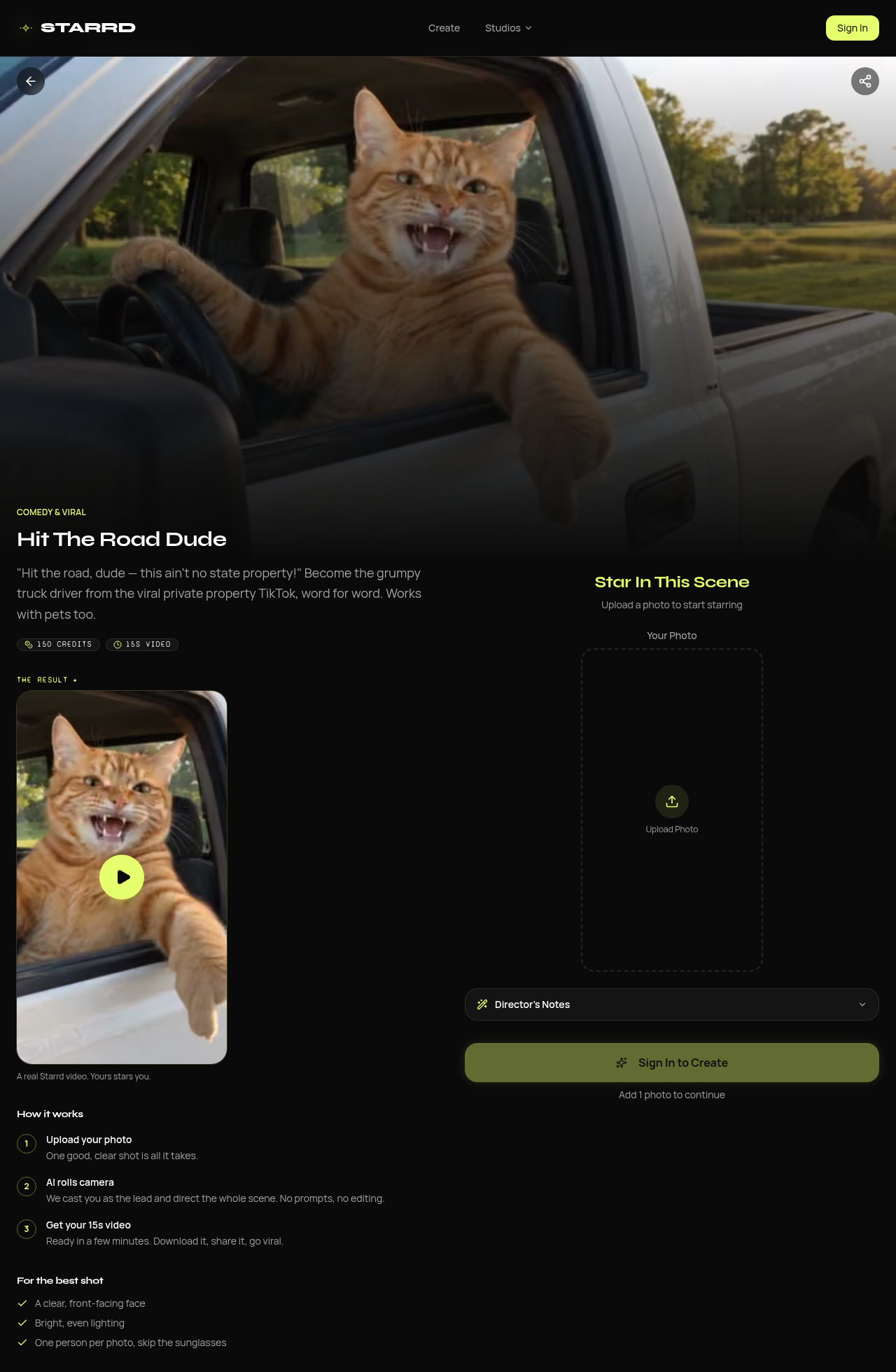
Source: Starrd, https://www.getstarrd.app/template/hit-the-road-dude-ai-video, captured 2026-10-21. The crop keeps the heading, the one-photo line, 150 credits, 15 seconds, and the photo rules.
Starrd, 30 seconds
Use the extended template when you want the drive-up and the name request, and you will spend more credits.
Direct link: Hit The Road Dude (Extended). A GET on 2026-10-21 returned HTTP 200, with no redirect. The page says the full 30-second confrontation runs from "Got permission?" to taking your name, and that it works with pets too. Badges read 200 credits and 30 s video. The how-to again names Seedance 2.5, one photo, and no prompt. The same best-shot rules apply. The page prints no dollar total for 200 credits.
The 28 September guide calls this the first 30 seconds: the pickup rolls up along the pond ("Got permission?"), the setup before the confrontation, the private-property lines, and the ending where a notepad and pen come out and the name is written down. It prints 200 credits (about $10), 30 seconds, vertical 9:16. The public preview file measured 480 by 854 and 30.042 seconds, at 24 frames per second, with an audio track. A sampled frame shows the same kind of orange tabby at the window, with water behind the truck. That frame does not show a notepad. Treat the notepad as the guide's description.
Other platforms
Kling's video-effects page and Higgsfield's Genjutsu page had no Hit the Road Dude preset in the HTML fetched on 2026-10-21. A CapCut template for this meme was not verified that day. A price for this meme on Kling or Higgsfield was not observed.
Build it without Starrd by following the guide's motion-transfer path. Make one still from a photo you are allowed to use, then give that still and a reference performance to a model that copies motion. The guide recommends Seedance 2.5 and says the still decides who and where, while the reference decides the performance and the camera. Paste this still prompt, which is the guide's "The still" text:
A photorealistic phone-video still. The subject from the reference photo sits in the driver's seat of an old white pickup truck with the driver's window rolled fully down, parked on green grass beside a pond on a sunny late afternoon. Camera just outside the driver's door at a three-quarter front angle, framing them from the top of the head to the waist, face large, sharp and looking toward the camera. One hand on the steering wheel, the other forearm resting along the top of the door, mouth slightly open mid-word, a grumpy, suspicious expression. Keep their exact face, hair and clothing. No text.
Tell the model which lines belong to the driver so the mouth stays shut while the other person talks. The guide then says to put the original audio back on. That soundtrack is the phone clip. See Before you post before you publish it. Kling and Higgsfield are the image-to-video and motion-transfer tools for this path when you are not on the Starrd template. Their effect pages did not list this scene.
Three steps
- Tool — Open Hit The Road Dude on Starrd. For the longer cut, open the extended template instead. Sign in when the page asks.
- Input — Upload one clear, front-facing photo. Use bright, even light. Keep the photo to one person, or one pet, and skip sunglasses. On the template you do not paste a prompt. Add Director's Notes only if you want to change a detail the page allows. If you are on Kling or Higgsfield, paste the still prompt above and use motion transfer from a reference clip.
- Export — On the 15-second template, download the file the page generates. On 2026-10-21 that page printed 15 seconds and 150 credits, and it left the ratio unprinted. The September guide says vertical 9:16. The CDN preview measured 854 by 480. On the extended template, the page printed 30 seconds and 200 credits, and the CDN preview measured 480 by 854. Use the ratio and the credit total the template shows on the day you press Create. The how-to says the file is ready in a few minutes.
Before you post
- Likeness — Get permission before you put a real person's face in the driver's seat. The template casts that face as the person saying the lines. Use a pet photo only when you have the right to use that photo. Starrd's best-shot list asks for one subject per photo.
- AI label — Label the post where the platform asks. YouTube requires creators to disclose AI-generated or altered content that seems realistic, including content that makes a real person appear to say or do something they did not do, and content that generates a realistic scene that did not occur. This remake does both: the photo subject appears to deliver the driver's lines, in a pickup scene from the phone video. The help page is Disclosing use of GenAI content.
- Rights — Starrd's guide says the template lays the original audio, both voices from the phone clip, over the new picture, and that you do not record the lines yourself. That is a claim about Starrd's template. It is not a claim about Kling or Higgsfield. If you follow the guide's build-it-yourself steps, those steps also say to put that original audio back on. Check that you can use the phone clip's soundtrack, and anyone else's likeness, before you publish.
Related pages
- Tools: Kling, Higgsfield — image-to-video and motion transfer when you build the still yourself. On 2026-10-21 their effect pages had no preset named for this meme.
- Models: Seedance — Starrd's template how-to says Seedance 2.5 makes this video. The directory page covers Seedance image-to-video, including the 2.5 cards.
FAQ
Do I record the lines myself?
On Starrd's template, no. The 28 September 2026 guide says you lip-sync the original audio and the voice is the real clip. Your mouth moves. The voice stays the phone video's voice. The template how-to also says you do not write the prompt.
Does the welcome bonus cover this template?
The pricing page says a new account starts with a 20-credit welcome bonus, enough for two AI songs at 10 credits each. The 15-second template printed 150 credits on 2026-10-21. The smallest pack on that pricing page is 100 credits for $4.99. Set the printed 20 and the printed 100 next to the printed 150 before you assume one bonus or one smallest pack pays for the render. The page does not print a dollar total for 150 credits.