First observed
Hop Hop Hop AI
Two clothed adults in an 8-second vertical clip: one stands at the camera and points, the other hops farther back under a flat palm, then a hard cut swaps their places.
Checked by ClipNav Team · Last verified
www.tiktok.com
Source: 2026-11-04 radar keyword. TikTok posts by @venadeaakira, @gabilagaba, @wika.t_18, and @nirami1, plus Hop Hop Hop AI, Kling motion control, and Higgsfield Genjutsu.
What it is
Hop Hop Hop is a two-person comedy bit. One person stands close to a phone that stays still and points back. The other person is several steps farther away, hops on the beat, and drops lower while a flat palm comes down in the foreground. A hard cut swaps them, and the second person does the point and the palm. You upload one or two photos of adults who agreed. You do not film the hop, and on Hop Hop Hop AI you do not write a prompt. The file that page returns is an 8-second vertical clip.
The posts below are other people's clips. This page includes no clip we made.
@wika.t_18 posted the street version on 22 October 2026 UTC. The caption is "Хоп хоп @Беата". The saved file runs 8.7 seconds and has an audio track. The sound credit on the file reads "suara asli - Venadeaakira". Sampled frames show two people in jackets, jeans, and boots on a cobblestone street at night, in front of a lit building. One person in a black jacket is close to the lens and points. The other, in a brown jacket, stands farther back. A flat palm then sits over the farther person's head. Later frames have swapped them: the person who was farther back is now the arm at the lens, and the person in the black jacket is hopping in the distance.
Source: @wika.t_18 on TikTok, https://www.tiktok.com/@wika.t_18/video/7699368512296406279
@nirami1 posted the hallway version on 24 October 2026 UTC. The caption is "squished or get squashed w/@Cole inspo by : @kiara mia and @gabi #fyp". The saved file runs 8.2 seconds and has an audio track. The sound credit on the file also reads "suara asli - Venadeaakira". Sampled frames show a narrow indoor hallway. A man in a long black coat and round sunglasses is close to the lens. Farther back, a woman wears a long red coat, a white skirt, white boots, and a light lace head covering. She hops with one foot up. He raises a flat palm. By the frame around 4 seconds they have swapped: she is close to the lens in the red coat, and he is farther down the hall in the black coat.
Source: @nirami1 on TikTok, https://www.tiktok.com/@nirami1/video/7700291582259514657
Hop Hop Hop AI calls the same routine "squished or get squashed": you at the camera, three hops, a flat palm, then a hard cut and they do it back. Its own example, which the page says was made from two AI test photos, is a clothed pair in a grey hallway. The woman in a cream sweater holds a flat palm. The man in a navy jacket is crouched farther back. That example file runs 8.3 seconds at 720 by 1280 and has an audio track.
Template preview
www.tiktok.com
Timeline
The sound credit on the two dance files above is Venadeaakira's original sound, and that account's post is from 24 September 2026. The clothed duo clips on this page are from 18, 22, and 24 October 2026. Hop Hop Hop AI was still up on 4 November 2026.
- 2026-09-24 12:59:56 UTC (2026-09-24 20:59 Asia/Singapore) · @venadeaakira posts a CapCut clip. The caption is "#CapCut". The saved file runs 11.9 seconds and has an audio track. The sound credit reads "suara asli - Venadeaakira". Sampled frames are pencil lines on notebook paper. It is not the two-person hop, so it is not embedded. Hop Hop Hop AI later tells you to add "original sound - venadeaakira" at 0:00 if you post its silent file. · TikTok
- 2026-10-18 21:48:53 UTC (2026-10-19 05:48 Asia/Singapore) · @gabilagaba posts the clothed duo with @Kokokrunch. One person in a black zip hoodie and white pants stands close to the lens and points. The other, in a black long-sleeve top and ripped jeans, hops farther back. A flat palm comes down. Later frames have swapped them. The caption is "MY TRRENDD W TWIN @Kokokrunch #edit #facecheck #animation #kawaii #gacha". The sound credit is "suara asli - Venadeaakira". · TikTok
- 2026-10-22 06:02:13 UTC (2026-10-22 14:02 Asia/Singapore) · @wika.t_18 posts the night-street duo in jackets and jeans. The caption is "Хоп хоп @Беата". · TikTok
- 2026-10-24 18:13:59 UTC (2026-10-25 02:13 Asia/Singapore) · @nirami1 posts the hallway duo. The caption is "squished or get squashed w/@Cole inspo by : @kiara mia and @gabi #fyp". · TikTok
- 2026-10-31 · Hop Hop Hop AI's page prints "Updated October 31, 2026". The same page is the photo form for this routine. · Hop Hop Hop AI
- 2026-11-04 · Hop Hop Hop AI still shows the photo form and the prices below. Kling's motion-control page had no preset named for this routine. A CapCut template titled Hop hop hop shows cartoon animals on a green screen, so it is not this routine and the URL is left off this page. · Hop Hop Hop AI · Kling motion control
Where to make it
Open the page below, add one photo per adult who agreed, and download the 8-second vertical clip. You do not write a prompt there. Prices come from the product pages. Read the number on the button the day you pay.
Hop Hop Hop AI
Use this in the browser when you want you and one friend in one 8-second file, and you have a photo for each person. There is no app and no subscription. Your photo starts at the camera. The second photo starts down the hall. If you leave that slot empty, the page says its example's friend stands there. A group photo of the two of you can fill both spots.
Direct link: Hop Hop Hop AI.
The form says: 1 or 2 photos, or one photo of you both. JPG, PNG, or WEBP, up to 25 MB each. The slots are labeled "At the camera · You" and "Down the hall". The line under the slots says "No friend's photo? Our example's friend stands down the hall", with a link for one group photo. The button says "See me in it · free". Under it: "Free preview · no sign-up · no card". The agreement line says that by generating a video you confirm everyone pictured has agreed.
The homepage paragraph says Hop Hop Hop AI turns 1 or 2 photos into an 8-second, 9:16 video: you at the camera pointing down a grey hallway, your friend hopping three times on the beat, your flat palm squishing them to the floor, then a hard cut and they squish you. It says to watch a free preview, then get one HD (720p) video for $6.99, ready in about 6 minutes. The checks under that line say: free preview, you and a friend with the swap included, from $3.33 per HD video, pay once with no subscription, and credits back if it fails. The full file has no watermark. The free preview is the first 4 seconds, before the swap, and that preview is watermarked. The page says one free preview per device. The FAQ says the free preview takes about 5 minutes and a full video usually takes a few minutes. You can close the page. The file waits under My videos.
Everyone keeps the face, hair, and clothes from their photo. The grey hallway and the fixed camera stay as in the trend. The page says adults only, and no photos of celebrities or other public figures. Photos are used only to make the video and are deleted, with the videos, after 30 days. A video that does not generate returns its credits. A video you simply dislike does not. The pricing page says purchases are final except where the law gives you a right to a refund, and a mistaken charge goes to support@hophophopai.app.
Packs on that pricing page. An 8-second video uses 100 credits in HD (720p) or 50 in Standard (480p). The packs are one-time, and credits never expire:
- $6.99 for 100 credits: 1 HD video, or 2 Standard videos ($3.50 each).
- $9.90 for 200 credits: 2 HD videos ($4.95 each), or 4 Standard videos ($2.48 each). The page also prints "2 × $6.99 = $13.98" beside this pack.
- $19.90 for 500 credits: 5 HD videos ($3.98 each), or 10 Standard videos ($1.99 each). The page also prints "5 × $6.99 = $34.95" beside this pack.
- $39.90 for 1200 credits: 12 HD videos ($3.33 each), or 24 Standard videos ($1.66 each). The page also prints "12 × $6.99 = $83.88" beside this pack.
The pricing page says the price is per video, not per person in it. The footer says the site is an independent tool, not affiliated with, endorsed, or sponsored by Shluzov, TikTok, ByteDance, or CapCut. The FAQ says it is not affiliated with Shluzov, TikTok, or the people in the original videos. Full videos include the sped-up trend sound, and you can also download a silent MP4.
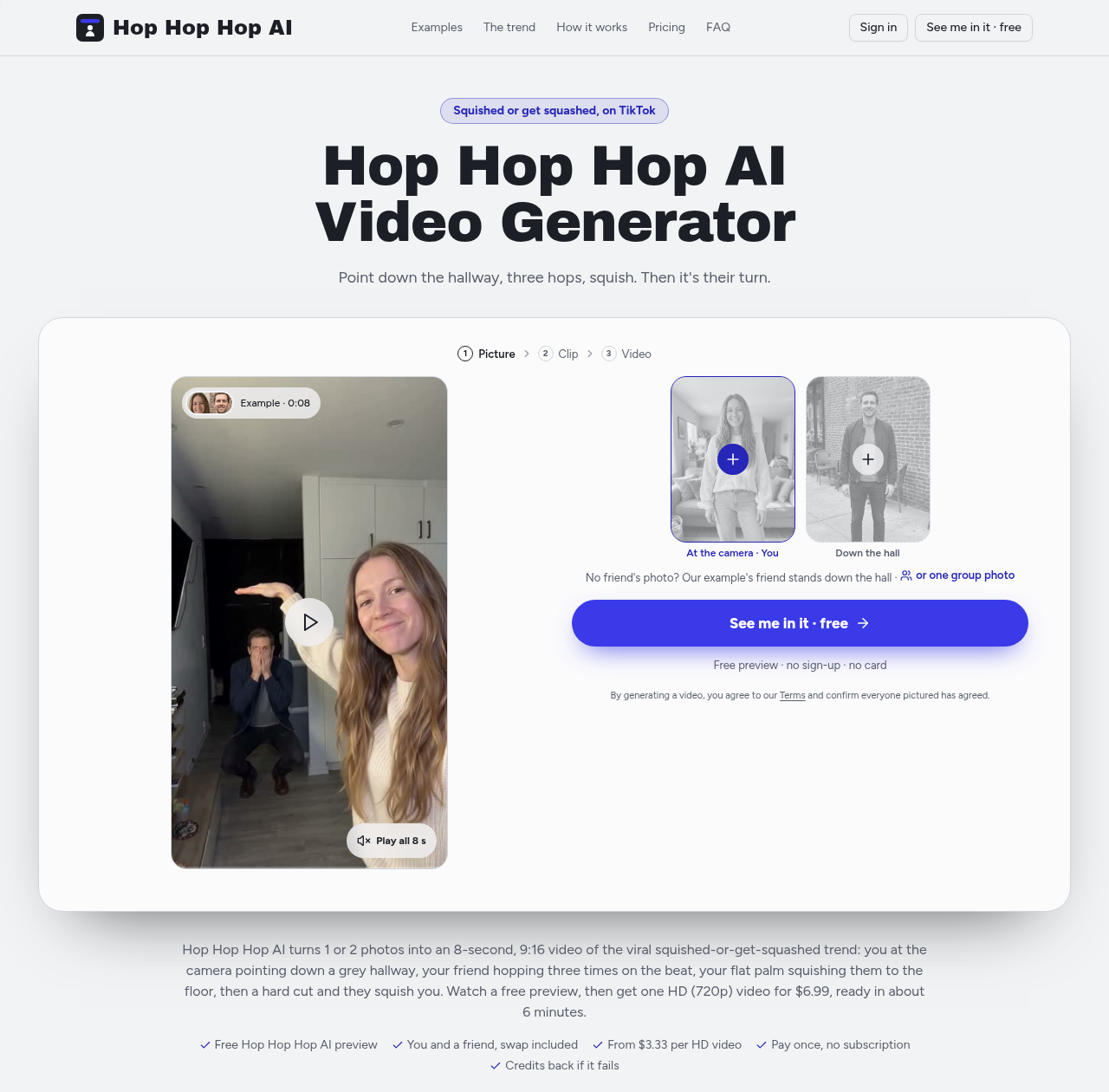
Source: Hop Hop Hop AI, https://hophophopai.app/, captured 2026-11-04.
Other platforms
CapCut, Kling, and Higgsfield had no Hop Hop Hop template for this two-person routine.
A CapCut template whose title is Hop hop hop shows cartoon animals on a green screen, saved at about 8.2 seconds and 718 by 1280. That is a different clip, so it is not the path and the URL is not listed here. Kling motion control is a different job from the form above. The page says to bring a static image to life by uploading a reference video. It also says motion control supports one primary subject, and if several faces are in the frame it prioritizes the dominant one. Use one still of one adult, plus a reference video of a public routine you have the right to use. Do not paste a two-person prompt into that page. The page had no preset named for this routine. Kling's motion-control page does not print a dollar price for this routine. Confirm the credit cost on the screen before you generate. The same page says motion control copies movement and expressions, and it points speech and lip-sync to a different Kling path, so do not expect this routine's song from that page.
If your tool takes two photos and a written prompt, paste this. It describes the public routine in the two clips above, whose saved files run 8.7 and 8.2 seconds, and the 8-second file Hop Hop Hop AI describes. We did not run it. Do not paste it into Kling motion control, and do not paste it into Hop Hop Hop AI. That form has no prompt box.
Vertical 9:16, about 8 seconds, one fixed phone camera in a plain hallway. Two clothed adults. Person A stands close to the lens and points back. Person B stands several meters behind and hops in place. Person A lowers a flat palm in the foreground. Person B drops into a crouch. Hard cut. They swap: Person B is now close to the lens and Person A is far behind, and the point, the hop, and the palm happen again. Keep each face, hair, and outfit the same. No text, no watermark, no extra people.
Three steps
- Tool — Open Hop Hop Hop AI for the 8-second file from one or two photos. Leave the prompt blank. That form is the path that builds the pair. Kling motion control is separate: one still image plus a reference video, one primary subject, linked under Other platforms. A tool that takes two photos and a written prompt gets the fenced prompt under Other platforms. Do not paste that prompt into Kling motion control.
- Input — On Hop Hop Hop AI, add your photo in "At the camera · You" and your friend's photo in "Down the hall", or one photo of you both. Face the camera, in clear light, with the outfit you want to keep. Confirm everyone pictured agreed, and that they are adults who are not celebrities or public figures. If you upload only your photo, the page says its example's friend stands down the hall. On Kling motion control, upload one still and the reference video. Do not look for two photo slots there.
- Export — On Hop Hop Hop AI, download the vertical 9:16 MP4. The page says the full file is 8 seconds, HD at 720p or Standard at 480p, with no watermark, and the trend sound is already in it. A silent MP4 is also offered. The free preview is only the first 4 seconds and is watermarked. The two public clips above run 8.7 and 8.2 seconds. On a prompt tool, export vertical 9:16 at about 8 seconds.
Before you post
- Likeness — Use your own face or an adult who agreed. Hop Hop Hop AI's agreement line says everyone pictured has agreed, and its FAQ says adults only, with no celebrities or other public figures. Ask before you upload a friend. Do not upload a child, a stranger, or a celebrity. If you leave the second slot empty, the form says "No friend's photo? Our example's friend stands down the hall." The example videos on that page are a separate line: the page says those videos were made from two AI test photos.
- AI label — The clip is made from still photos. The people in it did not film these moves. Turn on the AI-generated label where TikTok, Reels, or Shorts asks for it before you post. The footer says this site is an independent tool, not affiliated with, endorsed, or sponsored by Shluzov, TikTok, ByteDance, or CapCut.
- Rights — Both dance files above carry the sound credit "suara asli - Venadeaakira". Hop Hop Hop AI calls that sound a sped-up cut of Shluzov's "Её парень" ("Her boyfriend") and says the song belongs to its owners and that the site grants no rights to it. This page does not identify the recording inside each saved file. Use the sound credit on the post, or the sound the product names, and add a sound you may use when you publish. The download can include the sound, or you can take the silent MP4 and add "original sound - venadeaakira" at 0:00 inside TikTok. The hallway caption credits @kiara mia and @gabi as the inspiration and @Cole as the other person in that post. Credit them if you describe the routine.
Related pages
- Tools: CapCut is where a one-photo template usually lives. A template titled Hop hop hop shows cartoon animals on a green screen, so it is not this routine. Kling is the general motion-transfer door when you already have one still and a reference video. Its motion-control page supports one primary subject, not a two-photo form. Higgsfield has no Hop Hop Hop template for this routine.
- Models: Kling motion control takes one still image and a reference video. Use it only as that general path. It is not a Hop Hop Hop template.
- Workflows: Photo to trend clip is the generate-and-post path for a photo gag like this. Captions and covers is the finish if you still need type or a cover frame after the MP4 downloads.
- Feature: AI dance video is the photo-to-dance pattern this generator uses.
FAQ
What song is on a Hop Hop Hop clip?
The two dance files embedded above credit the sound as "suara asli - Venadeaakira". The 24 September 2026 post by @venadeaakira carries the same credit. Hop Hop Hop AI calls the sound a sped-up cut of Shluzov's "Её парень" ("Her boyfriend"), and it tells you to add "original sound - venadeaakira" at 0:00 if you post the silent file. Use the sound credit on the file. On the generator, the sound is already in the download. You do not add it in a prompt.
How many photos do I need?
One is enough. Your photo starts at the camera, and the page says its example's friend stands down the hall. Add a second photo and that friend takes the far spot, then the swap. One photo of you both can fill both spots. Each person needs a human face. The FAQ on that page says a pet is not supported yet. A sharper, front-facing photo is what the page recommends when a preview looks wrong.
Do I have to film the hop?
No. On Hop Hop Hop AI you upload photos and press the button. You do not rehearse, and you do not paste a prompt. The hallway, the hops, the palm, and the cut are already set. If you would rather film it, the public clips above are the routine: one person at the lens, one person farther back, a flat palm, then a hard cut that swaps them.
What length and shape should I export?
On Hop Hop Hop AI, export the vertical 9:16 file it already made: 8 seconds, HD 720p or Standard 480p, with no watermark on the full file. The song is in that download, and a silent MP4 is also offered. The free preview is the first 4 seconds and is watermarked, so it stops before the swap. The street clip above runs 8.7 seconds and the hallway clip runs 8.2 seconds. A prompt tool should export vertical 9:16 at about 8 seconds.
Can I put two people in one photo?
Yes. Hop Hop Hop AI says to upload one photo with the two of you and each of you fills a spot. If more people are in the picture, the page says to pick who to use. Two separate photos also work: the first starts at the camera and does the palm first, and after the cut the second person is at the camera. Use only adults who agreed.
Related tools
Related models
Related workflows
Related features
Related trends
Other effects made with the same tools and models.
- Angry Dance Filter — One front-facing photo becomes a short vertical comic kitchen rant in the Bad Times angry-dance style.
- Chipmunks Dance AI — One to three photos of adults become a 13-second vertical clip of people in a row, taking turns at the front, to a sped-up You Spin Me Round.
- Window Peeper — One photo of a person or a pet becomes a vertical night-window clip: the subject eats at a lit apartment window, stares into the camera, and a beige curtain closes.
- Dime Dime Baby AI — One photo becomes a short party-hall clip: the person walks toward the camera, bites a piece of bread, looks into the lens, and dances back into the crowd.