First observed
Window Peeper
One photo of a person or a pet becomes a vertical night-window clip: the subject eats at a lit apartment window, stares into the camera, and a beige curtain closes.
Checked by ClipNav Team · Last verified
not observed
Open CapCut (Window Peeper template)The template card does not print a dollar price. Confirm the charge in CapCut before you use the template.
www.tiktok.com
Source: 2026-10-27 radar keyword. Sources: the CapCut Window Peeper template, the TikTok posts, and the Window Peeper AI generator at aiwindowpeeper.video.
What it is
Window Peeper is the night-window snack joke. One photo of a person or a pet becomes a vertical clip of a lit apartment window. The subject eats, notices the camera, stares, and a beige curtain closes. Post it as a Reel, a Short, or a TikTok.
Use the CapCut template when you want that card's clip. Use the Window Peeper AI page when you want its stated 14-second 9:16 file from one photo. If you are in another image-to-video tool, paste the prompt in Where to make it.
The two posts below are other people's clips. This page includes no clip we made. The people in the kept clips are clothed. The pet clip is an English bulldog.
Source: therealrodentspawn on TikTok, https://www.tiktok.com/@therealrodentspawn/video/7698685812455591190
therealrodentspawn posted that clip at 2026-10-20 09:53:05 UTC, which is 2026-10-20 17:53:05 in Asia/Singapore. That time is the upload timestamp. The caption reads "Try this filter yourself" and carries #capcut #capcutpioneer #pioneertemplate #mrbean #windowpeeper. The file is 1080 by 1920, 14.000 seconds, 30 frames per second, with an audio track. The track credit is "original sound" by rodentspawn. The opening frame is a dark apartment facade with one lit window. Later frames move in on a man in a green tweed jacket, white shirt, and red tie, eating a burger at a small wooden table, staring into the lens, then pulling a beige curtain shut. A paper bag with a yellow arch and an orange food box sit on the table. The caption's #mrbean tag is the poster's. Use your own photo when you make a new clip.
Source: Just A Bulldog! (@justabulldog) on TikTok, https://www.tiktok.com/@justabulldog/video/7698850364711259414
Just A Bulldog! posted that clip at 2026-10-20 20:31:32 UTC, which is 2026-10-21 04:31:32 in Asia/Singapore. That time is the upload timestamp. The caption says the window peeper made them laugh and carries #windowpeeper. The file is 1080 by 1920, 7.012 seconds, with an audio track. The track credit is "original sound" by Just A Bulldog!. Sampled frames show an English bulldog at the same kind of table, holding a burger, tongue out, staring. On-screen text reads "window peeper", and an Ai mark sits in the corner. The last sampled frame shows a human hand pulling the beige curtain while the dog stays at the table. Do not describe the dog as closing the curtain with a paw.
Template preview
www.tiktok.com
Timeline
The earliest dated record found for this effect is the CapCut template on 20 October 2026. The same day, therealrodentspawn posted the 14-second street-to-window clip, and Just A Bulldog! posted the bulldog. The generator was still selling the effect on 27 October. Status stays hot.
- 2026-10-20 08:55:44 UTC (2026-10-20 16:55:44 Asia/Singapore) · theolic's CapCut template "Window Peeper" is recorded. The template
createTimeis that instant. · CapCut template - 2026-10-20 09:53:05 UTC (2026-10-20 17:53:05 Asia/Singapore) · therealrodentspawn posts the 14.000-second clip tagged #mrbean and #windowpeeper. The file opens on the dark facade and ends on the curtain. · therealrodentspawn
- 2026-10-20 20:31:32 UTC (2026-10-21 04:31:32 Asia/Singapore) · Just A Bulldog! posts the bulldog at the table with a burger. On-screen text reads "window peeper". A human hand pulls the curtain in the last sampled frame. · Just A Bulldog!
- 2026-10-21 20:52:53 UTC (2026-10-22 04:52:53 Asia/Singapore) · Just A Bulldog! posts a later kitchen-window clip of the same dog in a dark cape with a red lining. On-screen text reads "window peeper", and an Ai mark is in the corner. The file is 8.067 seconds, 720 by 1278, with an audio track credited as "som original" by Carla Carolina. · Just A Bulldog!
- 2026-10-27 · The Window Peeper AI generator is still up, with the credit packs below. Kling's video-effects page and Higgsfield's Genjutsu page had no Window Peeper preset. · Window Peeper AI · Kling effects · Higgsfield Genjutsu
Where to make it
Prices come from the product pages. CapCut has a direct template. Window Peeper AI is a one-photo generator for this effect. Kling and Higgsfield had no preset, so the prompt is the path there.
CapCut, Window Peeper template
Open this when you want the template card itself.
Direct link: Window Peeper by theolic
The card title is Window Peeper. The author is theolic. The visible row shows one clip, a badge of 00:09, and aspect ratio 9:16. The button reads "Use this template". Hashtags on the card are #trendingweek #aititans #mcdonalds #aifilter #peep. The template record lists capabilities clipping and ai_painting_v2, segmentAmount 1, videoRatio 9:16, and templateDuration 8173 milliseconds. The preview file is 720 by 1280, 8.200 seconds, 30 frames per second, with an audio track. Sampled frames are already tight on one window: a clothed older woman in a light blue patterned shirt, pink clips in white hair, eating a burger, then pulling a beige curtain. An Ai mark and a CapCut mark are on the frames. A paper bag with a yellow arch and an orange food box are on the table.
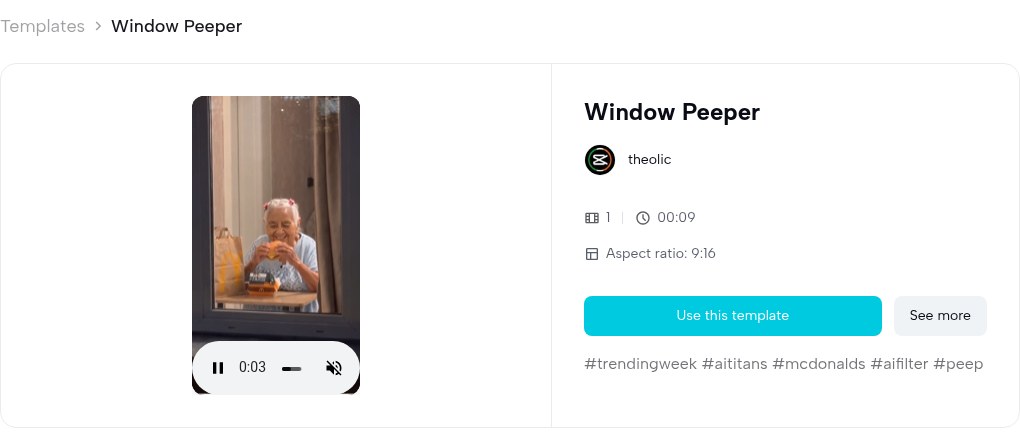
Source: CapCut, template by theolic, https://www.capcut.com/template-detail/Window-Peeper/7698670250123922694, captured 2026-10-27.
The card is the web template. The page did not print an upload-count sentence or a control for length. See the price on the product page. The badge says 00:09 and the file measures 8.200 seconds. Keep both.
Window Peeper AI
Open this in the browser when you want one photo in, and a prepared 14-second 9:16 clip out. The page is the generator for this effect. The title is "Window Peeper AI Video Generator | 1 Photo, The Stare". The line under the heading says: turn one photo into a 14-second window clip with the stare and curtain close. Three cards read "1 photo / A person or pet with a clear face", "14 seconds / One continuous night-window scene", and "Native 9:16 / Built for Reels, Shorts and TikTok".
The form asks for one clear photo of the person or pet, marked 0/1, with Max 8MB. The resolution control showed 720P Standard and Required Credits 100. The button reads "Sign In to Generate". The player on that form reads 0:00 / 0:14 and is labeled "Generated Window Peeper result". The sample frame is a clothed man in a navy polo, eating at the window. The paper bag in that sample shows a yellow arch. Under the form: "Credits are charged when the paid task starts. Photos are never used for training and are removed within 30 days."
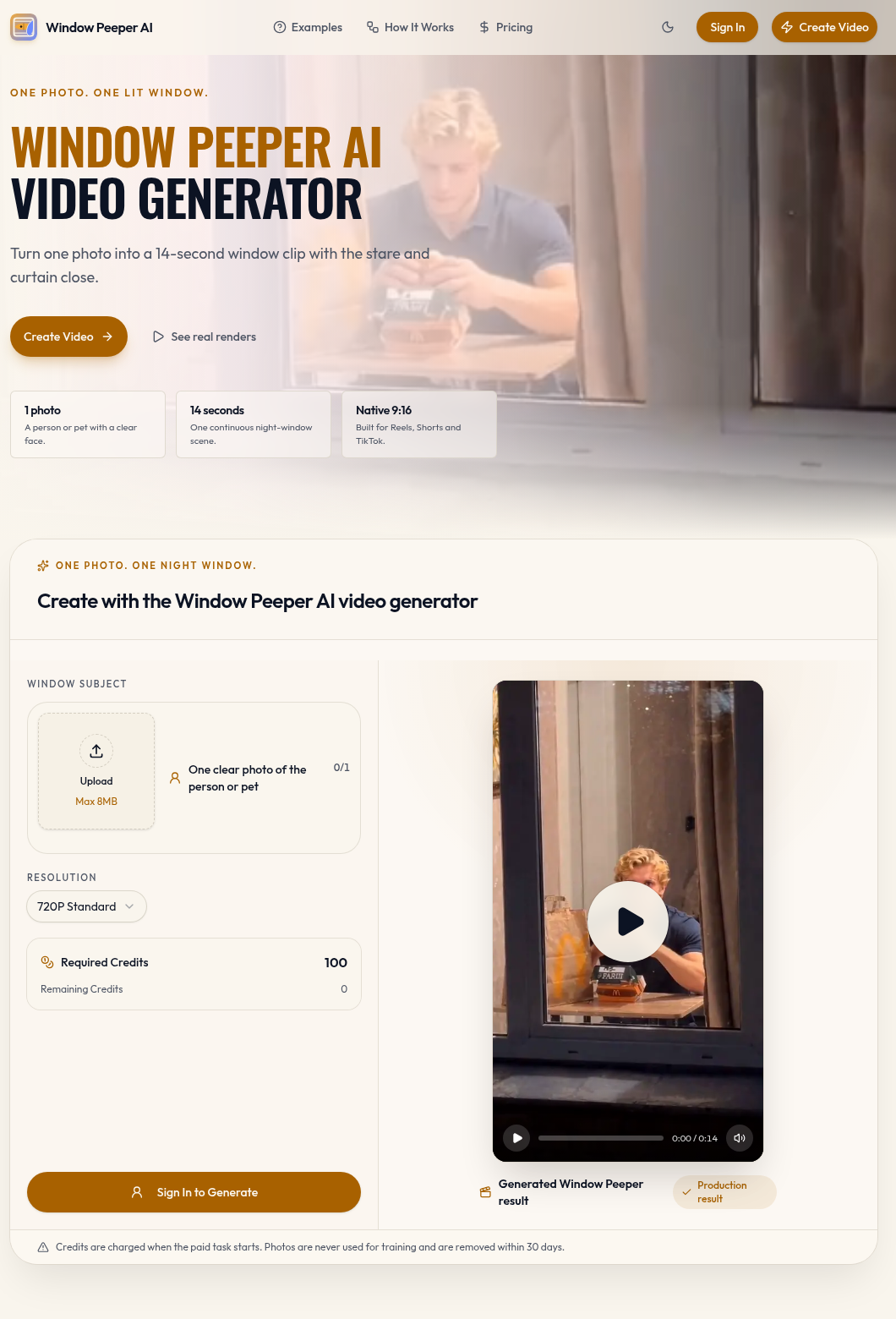
Source: Window Peeper AI, https://aiwindowpeeper.video/, captured 2026-10-27.
The site's own steps are: add one photo of the person or pet and keep the face or eyes unobstructed; pick 480P, 720P, or 1080P, with the credit cost shown before you submit; then download the prepared 14-second 9:16 clip that follows the original push-in, mid-bite stare, and curtain close. Its effect list is a dark facade, one warm-lit window, a forward push-in, a diner at a small table, a mid-bite pause, a direct stare, and a beige curtain closing. It says the result works for a person or a pet. It also says it is a web generator, and that you do not install a CapCut project file from this site.
Photo rules on the page: use a recent, well-lit photo; choose one person or pet with the face or eyes visible; the uploaded background and pose do not carry into the prepared apartment. "Keep the image appropriate. Use a photo you own or have permission to use. The scene is staged comedy, not a claim about a real neighbor or a real apartment." A front-facing photo with even light is the advice it prints. Sunglasses, masks, and heavy filters make the stare less clear. It also says: use your own photo or a photo you have permission to use, and do not upload restaurant branding, private material, or another person's image without consent.
"Start at 720P. 720P is the practical default for a 9:16 social clip. Use 480P for a composition check or 1080P when detail matters." Packs are one-time, from $7.90, with no subscription. Credits never expire. 480P uses 50 credits, 720P uses 100, and 1080P uses 200. The four packs on the page are $7.90 for 100 credits ($7.90 per 720P video; 1 at 720P or 2 at 480P), $27.90 for 400 credits ($6.98 per 720P video; 4 at 720P, 8 at 480P, or 2 at 1080P), $69.90 for 1,200 credits ($5.83 per 720P video; 12 at 720P, 24 at 480P, or 6 at 1080P), and $149 for 3,000 credits ($4.97 per 720P video; 30 at 720P, 60 at 480P, or 15 at 1080P). Each card says failed generations refund unused credits. The FAQ says there is no free generation tier, the template can be watched before you buy, and a technical failure refunds unused credits. A finished file that clearly misses the prepared template can be sent to support for a refund review. Completed videos are not refunded for personal preference. The page says the final video keeps the prepared scene soundtrack, so you do not write dialogue.
The same page says the food props are generic and that the product does not reproduce a restaurant logo, a wrapper, or a recognizable performer from the source clip. The homepage sample still shows a paper bag with a yellow arch. Read both. Your prompt, if you leave this site, should ask for a plain burger and no logos.
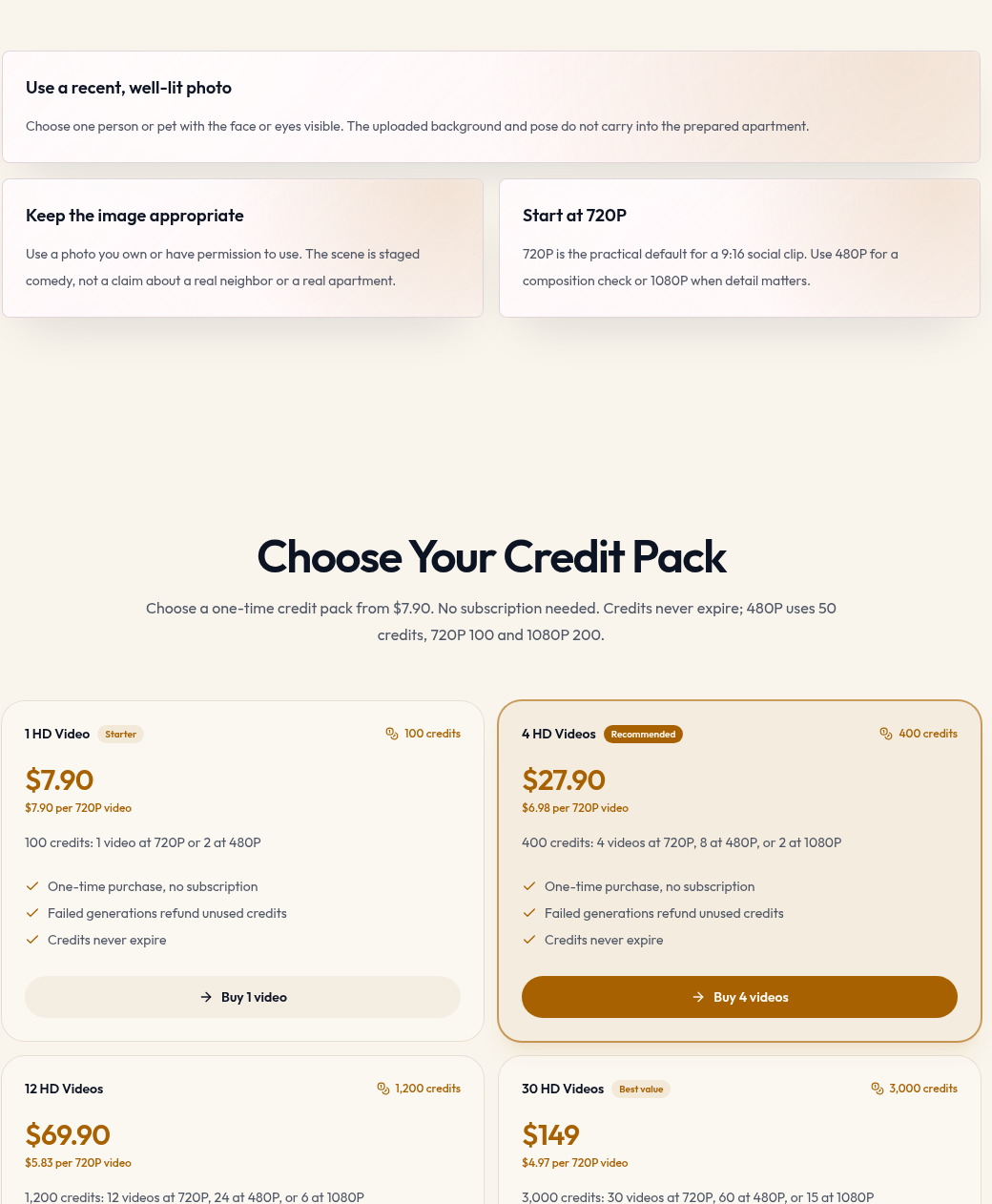
Source: Window Peeper AI, https://aiwindowpeeper.video/, captured 2026-10-27.
Other platforms
Kling's video-effects page and Higgsfield's Genjutsu page had no Window Peeper preset. Paste the prompt into image-to-video on either tool, with one photo you are allowed to use. Confirm the credit cost on the screen before you generate.
The wide push-in and the 14-second length come from the therealrodentspawn file, which opens on the facade and measures 14.000 seconds, and from the generator's stated 14-second push-in. The beige curtain, the table, and the stare are in the CapCut frames and in that TikTok. This block is not a quote from a vendor prompt page.
Use the person or pet in the reference photo. Keep their face and clothes. Night, outside a dark apartment block. One window is lit. The camera starts across the street and pushes in on that window. Inside, the subject sits at a small wooden table and eats a plain burger. They notice the camera, stop, and stare into the lens. A plain beige curtain is then pulled shut. Vertical 9:16. About 14 seconds. No logos. No text. No dialogue.
Three steps
- Open the path that matches the clip you want. For the CapCut card, open Window Peeper by theolic and press Use this template. For the 14-second one-photo file, open Window Peeper AI and sign in. For Kling or Higgsfield, open image-to-video and paste the prompt above.
- Use one photo you own or have permission to use. Pick one person or one pet, with the face or the eyes visible, in even light. On the generator, the upload box says Max 8MB, and the page says the uploaded background and pose do not carry into the apartment. Leave sunglasses and masks off. On CapCut, follow the template. The card shows one clip. It does not print a photo-count sentence.
- Export, then label the file as AI before you post. On the generator, start at 720P (100 credits) unless you want 480P for a check or 1080P for detail, and expect the 14-second 9:16 clip the page describes. Read the credit number before you submit. On CapCut, the preview file is 720 by 1280 and 8.200 seconds, and the badge reads 00:09. The card does not offer a length control. For the prompt, ask for 9:16 and about 14 seconds, then keep the length the tool actually returns.
Before you post
- Likeness — Use a photo of someone who agreed, or a pet you have permission to show. The generator says the scene is staged comedy, not a claim about a real neighbor or a real apartment, and it says it does not keep a recognizable performer from the source clip. The therealrodentspawn post is that creator's clip, tagged #mrbean. Do not upload a celebrity, a performer, or a stranger to recreate it.
- AI label — The CapCut preview and the bulldog files show an on-frame Ai mark. The TikTok player for both embedded posts displayed "Contains AI-generated media". Label your own post as AI-generated where the platform asks for it. The generator labels its sample "Generated Window Peeper result".
- Rights — The public clips and the generator sample show a paper bag with a yellow arch. The generator's written rule says it does not reproduce a restaurant logo. The prompt above asks for a plain burger and no logos. The therealrodentspawn audio credit is "original sound" by rodentspawn. The burger bulldog credit is "original sound" by Just A Bulldog!. The later bulldog file credits "som original" by Carla Carolina. The generator says its download keeps the prepared scene soundtrack. A sound on someone else's post is not a license to reuse. This page is not legal advice.
Related pages
- Tools: CapCut hosts the Window Peeper template by theolic. Kling and Higgsfield are where you paste the prompt. Their effect pages had no Window Peeper preset. Read each tool's own page for a price. This trend page does not restate those prices.
- Models: Kling and Higgsfield are the image-to-video models behind that prompt path. The Window Peeper AI page does not name a model, so this page does not assign one to that generator.
- Trends: AI zombie video is another one-photo CapCut-or-prompt meme with a fixed punchline beat, in the same short-form lane as this window snack gag. How I Become a Millionaire: Get a Job AI is the Starrd phone-skit swap when you want a talking-into-the-phone joke instead of the window.
FAQ
How long should my export be?
Match the path you opened. therealrodentspawn's file is 14.000 seconds and opens on the facade. The generator says its output is 14 seconds in 9:16, and its player reads 0:00 / 0:14. The CapCut preview file is 8.200 seconds (templateDuration 8173 milliseconds), while the card badge reads 00:09. The first bulldog file is 7.012 seconds. The later kitchen clip is 8.067 seconds. Ask a general image-to-video tool for about 14 seconds, then keep what it returns.
What photo do I upload?
One clear photo. On Window Peeper AI, that is one person or one pet, face or eyes visible, Max 8MB, and a photo you own or may use. The page says the uploaded background and pose stay out of the prepared apartment. The CapCut card shows one clip and does not print that upload sentence. Follow Use this template there.
Will the bag logo be in my clip?
The CapCut frames, the two burger TikToks, and the generator's homepage sample show a paper bag with a yellow arch. The generator's text says the product does not reproduce a restaurant logo, a wrapper, or a recognizable performer. If you use the prompt, it asks for a plain burger and no logos. The CapCut hashtag list includes #mcdonalds. That is text on the card, not an instruction to copy a mark.
Can I upload a celebrity, a child, or a stranger?
Use a photo you own or have permission to use. The generator tells you the scene is staged comedy, not a claim about a real neighbor, and that it does not preserve a recognizable performer. The #mrbean clip stays that poster's. Skip celebrities, strangers, and any photo you cannot explain. This page is not legal advice.
Related tools
Related models
Related workflows
Related features
Related trends
Other effects made with the same tools and models.
- Hotel Lobby AI — A template that drops two photos into Quavo and Takeoff's 2022 COLORS performance of Hotel Lobby and keeps the original motion and audio.
- Angry Dance Filter — One front-facing photo becomes a short vertical comic kitchen rant in the Bad Times angry-dance style.
- Dime Dime Baby AI — One photo becomes a short party-hall clip: the person walks toward the camera, bites a piece of bread, looks into the lens, and dances back into the crowd.
- Hop Hop Hop AI — Two clothed adults in an 8-second vertical clip: one stands at the camera and points, the other hops farther back under a flat palm, then a hard cut swaps their places.