First observed
Charme Dance AI
One selfie becomes a short vertical clip of you front-row at a Rio baile charme, doing the charme side steps.
Checked by ClipNav Team · Last verified
www.tiktok.com
Source: 2026-10-29 radar keyword. @seuzerj's TikTok, @zenegaooficial's TikTok, charmedance.video, and MakeViral's Charme Dance template.
What it is
Charme Dance AI puts you front-row at a baile charme, the Rio night street party where the floor dances charme: small gliding side steps, soft knees, rolling shoulders, and a cool turn. You upload one selfie. You do not film the party, and on the pages below you do not write a prompt. The finished clip is a short vertical video of the person in the photo doing those steps in a packed night crowd, with sound on the files that say so.
The joke that spread is an AI grandpa. On 16 October 2026 UTC, @seuzerj posted Seu Zé at Pedra do Sal. The caption reads "Ninguém botou fé no vovô no baile charme" (nobody believed in grandpa at the baile charme). MakeViral prints that English gloss. The same caption says Seu Zé is from the Viaduto de Madureira and credits "Original: @iae.zenegao". The posts below are other people's clips. This page includes no clip we made.
Source: @seuzerj on TikTok, https://www.tiktok.com/@seuzerj/video/7697396562670013716
The upload timestamp is 2026-10-16T22:30:07Z, which is 17 October 2026 at 06:30 in Asia/Singapore. The saved file is 1080 by 1920 and 27.7 seconds, with an audio track. Sampled frames show a clothed older dancer with white hair, round glasses, a moustache, a red shirt, black suspenders, and light trousers, close to the camera in a floodlit night crowd. The burned-in line is "NINGUÉM BOTOU FÉ NO VOVÔ NO BAILE CHARME".
The real dance is older than that edit. On 7 August 2026 UTC, @zenegaooficial posted a charme take tagged at Pedra do Sal. The caption is "Essa aqui vocês já sabe" with #bailecharme and a tag for Pedra do Sal Oficial. @seuzerj's caption names @iae.zenegao, not this account. This page does not treat the two handles as the same person. MakeViral's template says the grandpa clip puts Seu Zé into that Pedra do Sal dance. That sentence is theirs.
Source: @zenegaooficial on TikTok, https://www.tiktok.com/@zenegaooficial/video/7671334879467932935
The upload timestamp is 2026-08-07T16:57:25Z, which is 8 August 2026 at 00:57 in Asia/Singapore. The saved file is 1080 by 1920 and 2 minutes 7 seconds, with an audio track. Sampled frames show a clothed lead dancer in a white T-shirt and an open overshirt, cap on, stepping in a floodlit crowd under murals and blue tents.
Charme Dance AI's own page calls the effect a 12-second front-row version of that night-party clip. MakeViral calls it a 10-second clip of you in the same kind of crowd. Use the length printed on the page you open.
Template preview
www.tiktok.com
Timeline
The filmed dance is from August 2026. The AI grandpa clip is from 16 October 2026 UTC. The two one-photo pages were still up on 29 October 2026. Status stays hot.
- 2026-08-07 16:57:25 UTC (2026-08-08 00:57 Asia/Singapore) · @zenegaooficial posts a charme dance tagged at Pedra do Sal. The video timestamp is that instant. · TikTok
- 2026-10-16 22:30:07 UTC (2026-10-17 06:30 Asia/Singapore) · @seuzerj posts Seu Zé, the AI grandpa, captioned "Ninguém botou fé no vovô no baile charme", and credits Original: @iae.zenegao. · TikTok
- 2026-10-29 · Charme Dance AI and MakeViral's Charme Dance template still print a credit price for a one-photo charme clip. Kling's video-effects HTML and Higgsfield's Genjutsu HTML had no preset named for this dance. This page has no CapCut template link for this dance. · Charme Dance AI · MakeViral · Kling effects · Higgsfield Genjutsu
Where to make it
Open one of the two pages, upload a photo you may use, and download the vertical file. Prices come from the product pages. Read the credit number on the button the day you generate.
Charme Dance AI
Use this in the browser when you want one selfie, a fixed 12-second 9:16 clip, and the reference sound already in the MP4. You do not write a prompt.
Direct link: Charme Dance AI.
The heading says the tool puts you front-row at the baile charme. Upload one selfie and get a 12-second version of the viral Rio night-party clip, sound included. The line under the form says no CapCut, no prompts, and credits refunded on fail. The photo rules ask for one clear person, face visible, and the original photo rather than a screenshot. A checkbox says you have permission and that you will not upload children, celebrities, or anyone who has not agreed. 480p costs 1 credit. 720p costs 2 credits. The page says a run usually takes 3 to 10 minutes.
Packs are one-time and the page says credits never expire. There is no subscription. The cards print $9.99 for 1 credit (one 480p video; 720p needs 2 credits), $19.99 for 3 credits (three 480p videos or one 720p video), and $59.90 for 12 credits plus 2 bonus credits. That last card prints about $4.99 per 480p clip and "12× 480p or 6× 720p". A comparison row on the same page prints "From $5.99 a clip". Use the pack price on the button. A failed generation returns the credits. Completed files stay available for 24 hours, so download the MP4 the day it finishes. The FAQ says every clip is 12 seconds, vertical 9:16, with the reference sound already in the file. If a platform mutes the upload, add a baile charme sound in that app.
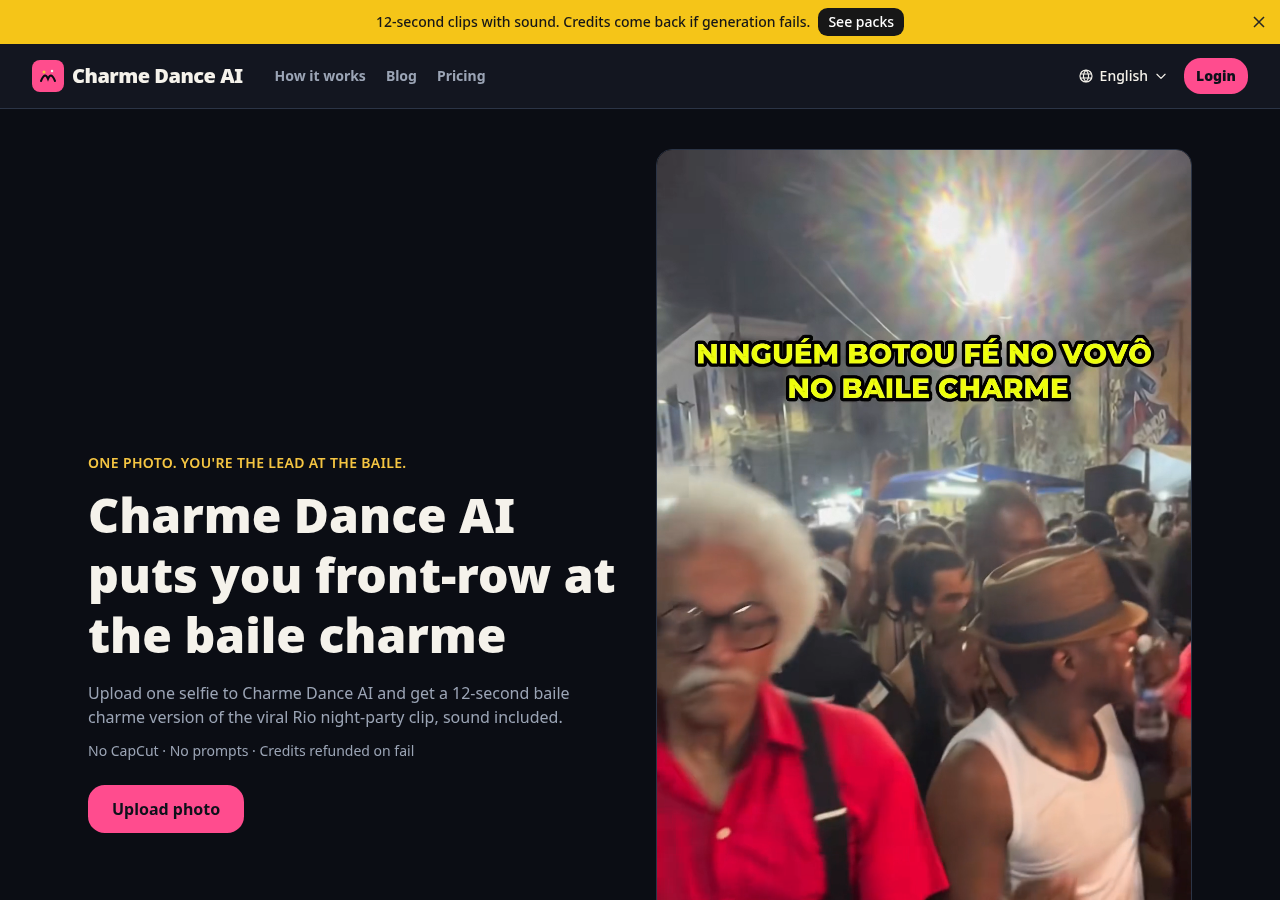
Source: Charme Dance AI, https://charmedance.video/, captured 2026-10-29.
MakeViral
Use this when you want a named template: one photo for you, two photos for a duo, or one photo of a pet. You do not write a prompt if you tap the template.
Direct link: Charme Dance AI.
The heading is "Charme Dance AI" and the subheading is "Dance in a Rio Street Party From One Photo". Add one photo of yourself, two for a duo, or one of your pet. Badges: 1 photo you add, 10 s clip with sound, 9:16, no watermark, no prompt to write, from 56 credits.
The version table splits the price. Human is one photo, face clear, knees up is best, Seedance 2.5, 10 seconds, 720p, 9:16, 126 credits. Duo is two photos, Seedance 2.5, 10 seconds, 720p, 9:16, 126 credits. Pet is one photo of the whole animal, Kling 3.0, 10 seconds, 1080p, 9:16, 56 credits. The hero line "From 56 credits" is the pet floor. A human run is the 126-credit line. The page says the clip comes with an original smooth soul groove and crowd sound made for that run, and that this is not the song from the viral clips. A failed video returns its credits. The photo rules say adults and pets only: your photo, your pet, or an adult who agreed. Never a celebrity or a stranger.
The template prints no dollar total for 126 credits. On the pricing page, one-time packs start at $9.99 for 100 credits, then 150 for $13.99, 450 for $39.99, 850 for $64.99, and 1,900 for $129.99. New accounts start with 0 credits. Comparing the printed numbers: 100 credits is under the 126-credit human line, and 150 credits covers it. That comparison is ours. The page does not print a dollar price for this template. Weekly, monthly, and a higher monthly plan are also printed there. They are not required for one template run.
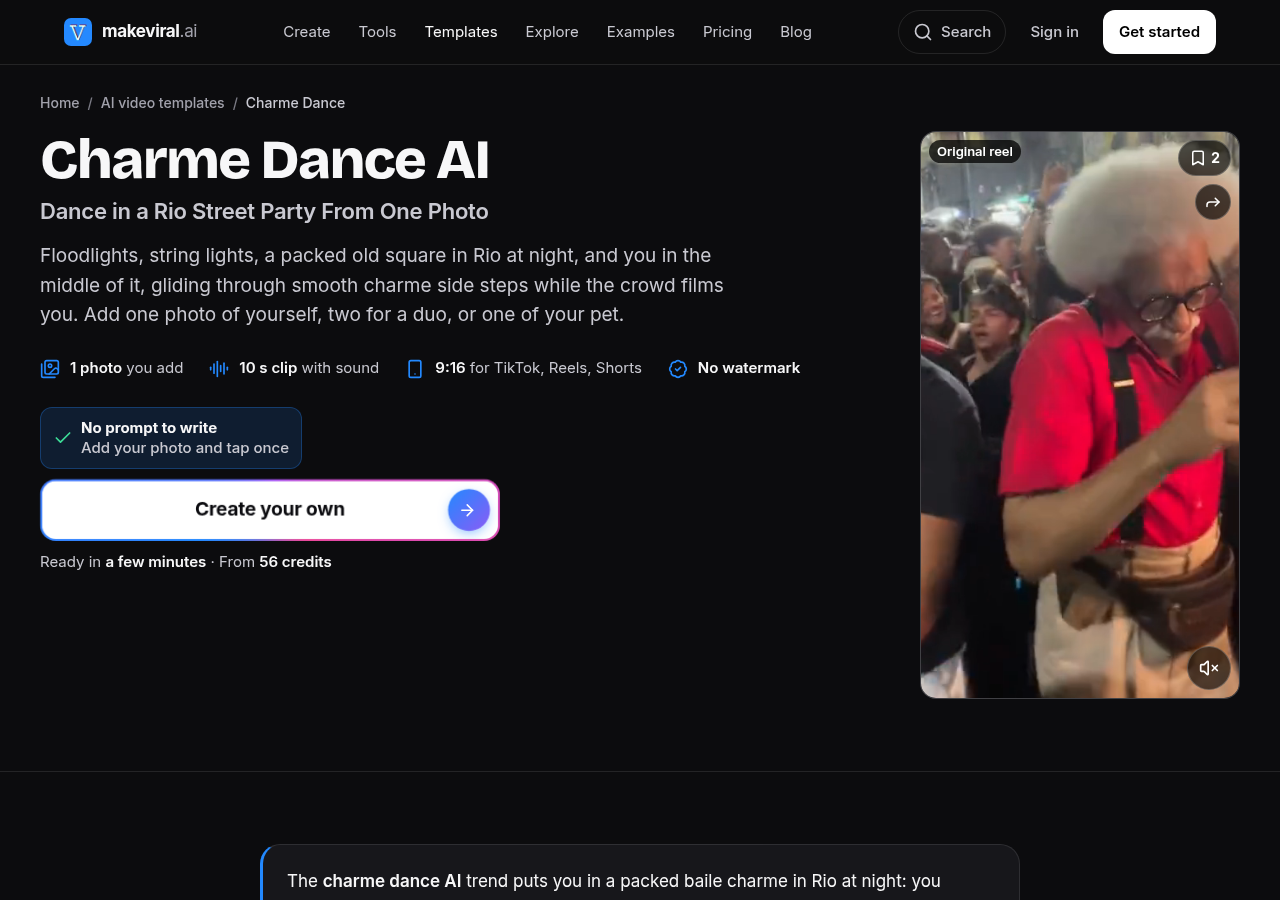
Source: MakeViral, https://www.makeviral.ai/templates/charme-dance-ai-trend, captured 2026-10-29.
Other platforms
Kling's video-effects HTML and Higgsfield's Genjutsu HTML had no preset named for this dance. CapCut, Kling, and Higgsfield do not print a price for this effect. Confirm the credit cost on the screen before you generate.
Build the clip without those pages by pasting the human prompt below into an image-to-video tool, or by using motion control. For motion control, open Kling AI Motion Control. The feature page says to upload a static character image and a motion reference video, optionally bind the face, then generate and export. It says motion control follows one primary subject and focuses on movement, not on the reference audio. The page names no charme preset. Use a photo you may use, and a reference clip you may use. The human prompt on MakeViral's template is this:
Animate the person in [Image 1]: they dance charme with smooth side steps in a crowded night street party in Rio. String lights. People film them with phones. Handheld phone video. One continuous vertical 9:16 shot with no cuts, like a real phone video filmed from inside the crowd at chest height, photorealistic, a little shaky, with natural night light.
The dancer is the person in [Image 1], in every frame: copy the exact face from [Image 1] (the face shape, eye color and eye shape, eyebrows, nose, mouth, skin tone, age, hair color, hair length and hairstyle, and any beard, moustache, glasses or freckles), the same build, and the clothes from [Image 1], so their friends recognize them at once. The dancer is an adult. The face stays the same from the first frame to the last, also in the head turns. Never morph. If [Image 1] shows an animal, the dancer is that animal standing upright on its hind legs, with its own face, fur and markings, not a person.
The place: a packed open-air charme party at night in an old square of Rio de Janeiro: old two-storey colonial houses with painted walls and murals, warm string lights across the street, bright white floodlights on tall poles, blue market tents. Hundreds of adult partygoers in summer clothes dance close around the dancers; many film them with their phones.
The dance is charme, the smooth Rio soul party dance: small gliding side steps left and right on the beat, one foot crossing behind the other, soft knees, rolling shoulders, the hands low in front of the hips, short cool turns to the side and back. Relaxed and stylish, never jumping.
0-3 s: a medium shot from the knees up: the dancer stands in the middle of the dancing crowd, nods to the beat and starts the charme step, sliding smoothly to the left and to the right.
3-6 s: the dancer glides two steps to one side and back, crosses one foot behind the other, turns the head to the side with a cool smile, then turns back to the camera. The people around them cheer and point at them.
6-8 s: the dancer leans in toward the phone with a big, proud smile: the face is large and sharp, exactly the face from [Image 1].
8-10 s: they step back into the crowd and keep dancing the smooth side steps on the beat, while two partygoers next to them hold up their phones and film them.
Audio: an original smooth old-school R&B and soul groove at a mid tempo, warm bass and soft keys, no known song and no lyrics; the crowd cheers, claps and chats. The dancer never speaks. Every other person is a generic adult partygoer: no famous people, no children. No logos, no club shirts, no brand names, no readable signs, no captions, no watermark. One head, two arms, two legs and five fingers per hand; a dancer never merges with another person.
Set the tool to vertical 9:16 and about 10 seconds if it lets you. If the file comes out silent, add a sound you have the right to use when you post.
Three steps
Use a one-photo page when you want the steps without writing a prompt. Use the prompt above when you are not on one of those pages.
- Tool — Open Charme Dance AI or Charme Dance on MakeViral. On MakeViral, leave Human selected for one person. Choose Duo or Pet only when you have the matching photos. If you are not on those pages, open Kling Motion Control or paste the prompt into an image-to-video tool set to 9:16.
- Input — Upload one clear photo you are allowed to use: one adult, face toward the camera, in even light. Charme Dance AI asks for a selfie and rejects children and celebrities. MakeViral Human wants the face clear and prefers knees up or full body, in the clothes you want on the floor. On those two pages you do not paste a prompt. On Kling, upload that still plus a reference clip you are allowed to use, or paste the prompt with the photo as the reference image.
- Export — Download the vertical file the same day. Charme Dance AI prints 12 seconds, 9:16, 480p at 1 credit or 720p at 2 credits, with the reference sound in the MP4, and the file stays up for 24 hours. MakeViral Human prints about 10 seconds, 720p, 9:16, and 126 credits, with its own groove, not the viral recording. If the file is silent, add a sound you may use in the app where you post.
Before you post
Post a photo you have the right to use, label the clip as AI, and treat the party recording as someone else's.
- Likeness — Get permission before you put a real person's face and body into the dance. Charme Dance AI's checkbox says you will not upload children, celebrities, or anyone who has not agreed. MakeViral says the template is for adults and pets, and tells you never to use a celebrity or a stranger. Skip anyone who has not agreed. Seu Zé is an AI character on @seuzerj's post, not a relative you can paste in without a photo you may use.
- AI label — Label the post where the platform asks. YouTube requires creators to disclose AI-generated or altered content that seems realistic, including content that makes a real person appear to do something they did not do, and content that generates a realistic scene that did not occur. This clip does that: the photo subject appears to dance at a party they were not filmed at. The help page is Disclosing use of GenAI content. The setting it names is AI use in YouTube Studio.
- Rights — The night-party recording belongs to its rights holders. This page does not identify the recording inside each saved file. Use the sound credit on the post, or the sound the product names, and add a sound you may use when you publish. @seuzerj's caption credits an original account. Charme Dance AI says the reference sound is already in its MP4. That does not grant you the recording. MakeViral says its groove is original to the run and is not the song from the viral clips, and that the viral song belongs to its owners. If you build the clip with motion control, the reference video needs its own permission. Kling's feature page says motion control does not carry the reference audio. If the file is silent, pick a sound you may use when you post.
Related pages
Kling is the motion-control path when you are not on a one-photo page. Seedance is the model MakeViral names for the human and duo versions. Higgsfield is the other image-to-video place to paste the prompt.
- Tools: Kling, Higgsfield — motion control and image-to-video when you upload a still plus a reference clip, or when you paste the charme prompt.
- Models: Kling, Seedance — MakeViral's pet version names Kling 3.0, and its human and duo versions name Seedance 2.5. The directory pages cover those models.
FAQ
Can I make this without a dedicated template?
Yes. Paste the charme prompt from Where to make it into an image-to-video tool set to vertical 9:16, or upload one still and a reference clip you may use to Kling Motion Control. Kling's feature page says that path follows the movement and does not keep the reference audio, so add a sound you may use when you post.
What do I need to upload?
One clear photo of one adult for Charme Dance AI and for MakeViral Human. Two photos for MakeViral Duo, one person in each. One photo of the whole animal for MakeViral Pet. Face the camera and use even light. You do not upload a video of yourself dancing on those templates. The pages reject children, celebrities, and strangers.
Does the clip include the original sound?
On Charme Dance AI, the page says the reference sound is already in the 12-second MP4. On MakeViral, the page says the clip has an original groove and crowd sound made for that run, and that this is not the song from the viral clips. On Kling Motion Control, the feature page says the tool follows movement, not the reference audio.
Who is Seu Zé?
Seu Zé de Madureira is the AI grandpa in @seuzerj's 16 October 2026 post, not a performer you hire. The caption says nobody believed in grandpa at the baile charme, names Pedra do Sal and the Viaduto de Madureira, and credits an original account. The generators put your photo in that kind of front-row step. They do not turn you into Seu Zé unless the photo is already that character and you have the right to use it.
Related tools
Related workflows
Related features
Related trends
Other effects made with the same tools and models.
- Smalltown Boy AI — One photo per person, or per pet, becomes the Smalltown Boy dance: one screams into the camera while the other dances behind, then they swap.
- Toc Toc Dance AI — One photo of you or your pet becomes the one-foot hop and imaginary-door knock danced to Patrick Sébastien's song Toc toc.
- Gangnam Style AI — One photo of you or your pet becomes the Gangnam Style horse dance: wrists crossed on invisible reins, a gallop in place, a lasso overhead, a side shuffle, and a point at the camera.
- AI rap video — Two photos become a lip-synced rap duo. One-tap pages write the lyrics and a beat. With no dedicated template, paste a two-person studio prompt into image-to-video and add a track you can use.