First observed
AI rap video
Two photos become a lip-synced rap duo. One-tap pages write the lyrics and a beat. With no dedicated template, paste a two-person studio prompt into image-to-video and add a track you can use.
Checked by ClipNav Team · Last verified
from $4.9
Open getairapFirst song $4.9 for a new user within 24 hours of signup, one per person. Single $9.9. Duo Pack $49 for 10 songs. Crew Pack $99 for 35 songs. Stage Pack $199 for 90 songs. One-time packs, credits do not expire, no subscription. The pricing page prints those per-song figures.
x.com
Source: 2026-10-27 radar keyword for AI rap video. Sources: public X posts, a photo-to-performance prompt article, getairap, and Kling, CapCut, and Higgsfield template pages.
What it is
An AI rap video puts two people at a microphone and has them trade lines. Upload two selfies, or one photo of both, and the finished clip is a short rap performance. One-tap pages also write original lyrics and a beat, then lip-sync both faces. A prompt page does the picture only. You add a track you already have a right to use.
The usual stage is simple. An orange or plain studio, one hanging mic, both people clothed, the camera holding still while they nod and gesture. That booth also shows up on the separate Hotel Lobby AI page, which drops two photos onto one existing performance and keeps that performance's motion and audio. Use this page when you want a duo you direct, or a new rap written for the pair.
The two posts below are other people's clips. This page does not include a clip we made.
Source: Nick Best (@nickbeststrong) on X, https://x.com/nickbeststrong/status/2103506806496719267
Nick Best posted that clip at 2026-09-25 15:27:58 UTC, which is 2026-09-25 23:27:58 in Asia/Singapore. The text says Robert Oberst and he are "spitting bars," then "Strongman by day, AI rap duo by night." The file is 720 by 1280, about 16.2 seconds, with audio. The frames show two adult men in athletic tops against orange, the picture stacked top and bottom, and a small Ai mark. The last frame is a black card with a CapCut logo and CapCut ID 8899748839. That ID is the export watermark on this file. It is not a template id, and it does not point to a rap-duo preset.
Source: RM Warner Law (@RMWarnerLaw1) on X, https://x.com/RMWarnerLaw1/status/2105722574252511351
RM Warner Law posted that clip at 2026-10-01 18:12:38 UTC, which is 2026-10-02 02:12:38 in Asia/Singapore. The text says "If you see two internet lawyers rapping, mind your business" and "Defamation defense by day. AI rap duo by night." The file is 1080 by 1920, about 24.1 seconds, with audio. The frames show two adult men in suits in an orange studio, one hanging microphone, fully clothed. A title on the picture reads "AI RAP VIDEO STARRING TWO REAL LAWYERS."
Template preview
x.com
Timeline
The earliest public clip on this page is Nick Best's duo on 2026-09-25. A prompt article followed on 2026-10-24. A browser launch post on 2026-10-26 says a two-selfie version was ready in about three minutes. That line is the post's own claim. Status stays hot.
- 2026-09-25 15:27:58 UTC (2026-09-25 23:27:58 Asia/Singapore) · Nick Best posted a vertical AI rap duo with Robert Oberst. The file ends on a CapCut export card. · Strongman duo
- 2026-10-01 18:12:38 UTC (2026-10-02 02:12:38 Asia/Singapore) · RM Warner Law posted two suited lawyers in an orange studio under one hanging mic. · Lawyer duo
- 2026-10-24 05:24:11 UTC (2026-10-24 13:24:11 Asia/Singapore) · A photo-to-performance article is timestamped here. It prints three prompts: a solo booth, a two-person exchange, and a quiet street. The article says the picture does not time a verse. · Rap video from a photo
- 2026-10-26 07:06:28 UTC (2026-10-26 15:06:28 Asia/Singapore) · crizquan posted that an AI rap video page was live, turning two selfies into a lip-synced duo with original lyrics, custom beats, and a stage, ready in about three minutes, in the browser. The post has no video. · Launch post
- 2026-10-27 · Kling's video-effects page had no AI rap duo preset. Higgsfield Genjutsu and CapCut also had no dedicated duo card. · Kling video effects
Where to make it
Use getairap when you want two selfies, a topic, and a finished song together. Use the Dreamina prompt when you want to direct the picture, then run Kling image-to-video and lip-sync a track you can use. Prices come from the product pages. Sign in before you generate. Read the credit cost on the screen.
getairap
Open this in the browser when both people have agreed to be in the clip and you want the site to write the rap. A logged-out visit to the generator shows Studio Booth and "Loading your account…". Sign in when it asks. The steps and the sample players live on the homepage.
Direct link: Make our rap video
The homepage says: "Turn two selfies into a lip-synced rap duo with original lyrics and beat. Studio Booth · HD · no watermark." The steps are: add two selfies or one photo together, with permission from everyone pictured; pick a topic, preview the photos, and sign in; generation uses one song credit. When the render is approved, play, download, and share it. A failed render returns the reserved credit. Buying a pack does not start generation. Photos upload when you submit.
The sample row is three players, all clothed: "How we met · Studio Booth", "Birthday shout-out · Morning Kitchen", and "Best friends · Night Platform". The line under them says sample faces are AI-generated, and your video uses the photos you upload. The players in the screenshot sit at 0:00. The page does not print a length or a ratio.
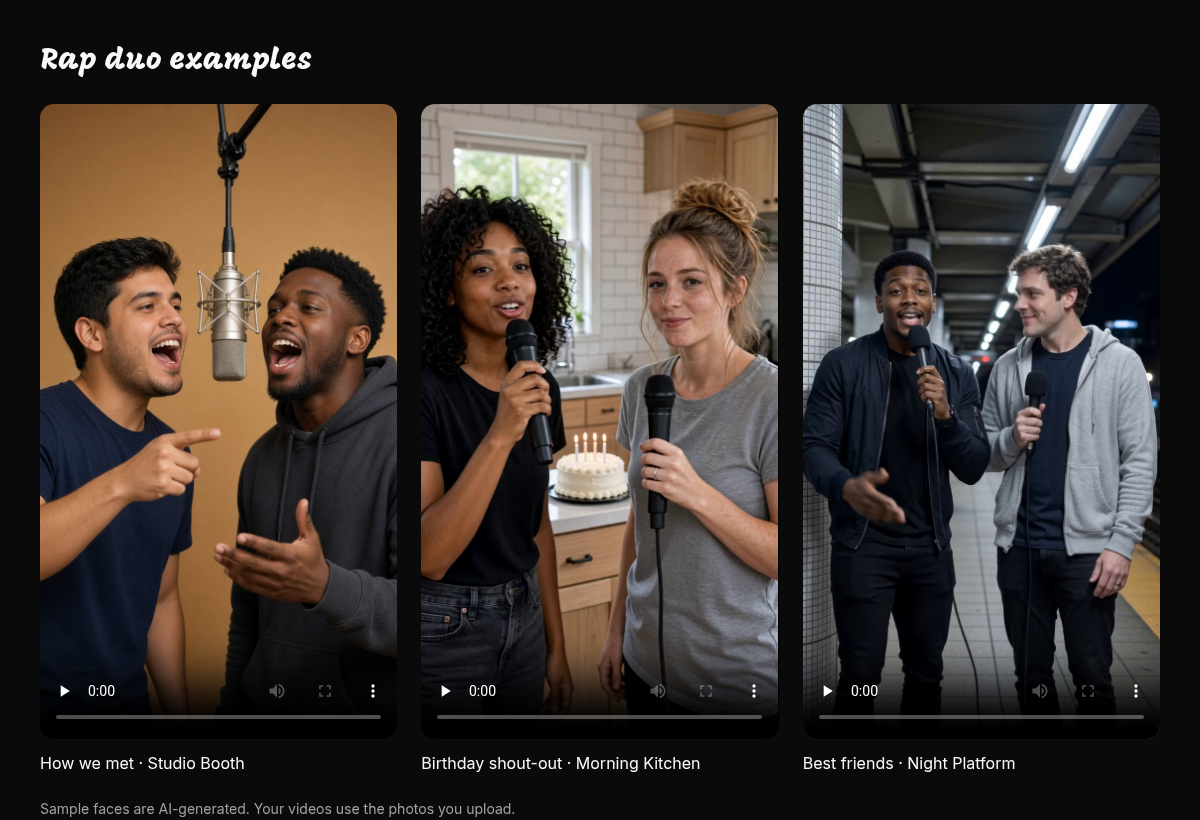
Source: getairap, https://getairap.com/, captured 2026-10-27. The crop is the three example players.
Price: pay once, credits do not expire, no subscription. First song $4.9 for a new user, one per person, within 24 hours of signup. Single $9.9. Duo Pack $49 for 10 songs ($4.9 / song on the card). Crew Pack $99 for 35 songs ($2.83 / song on the card). Stage Pack $199 for 90 songs ($2.21 / song on the card). Every card says HD, no watermark, and failed renders do not count. Credits land after payment. The homepage does not print a render time. The "about three minutes" line is the 2026-10-26 launch post, not a getairap sticker.
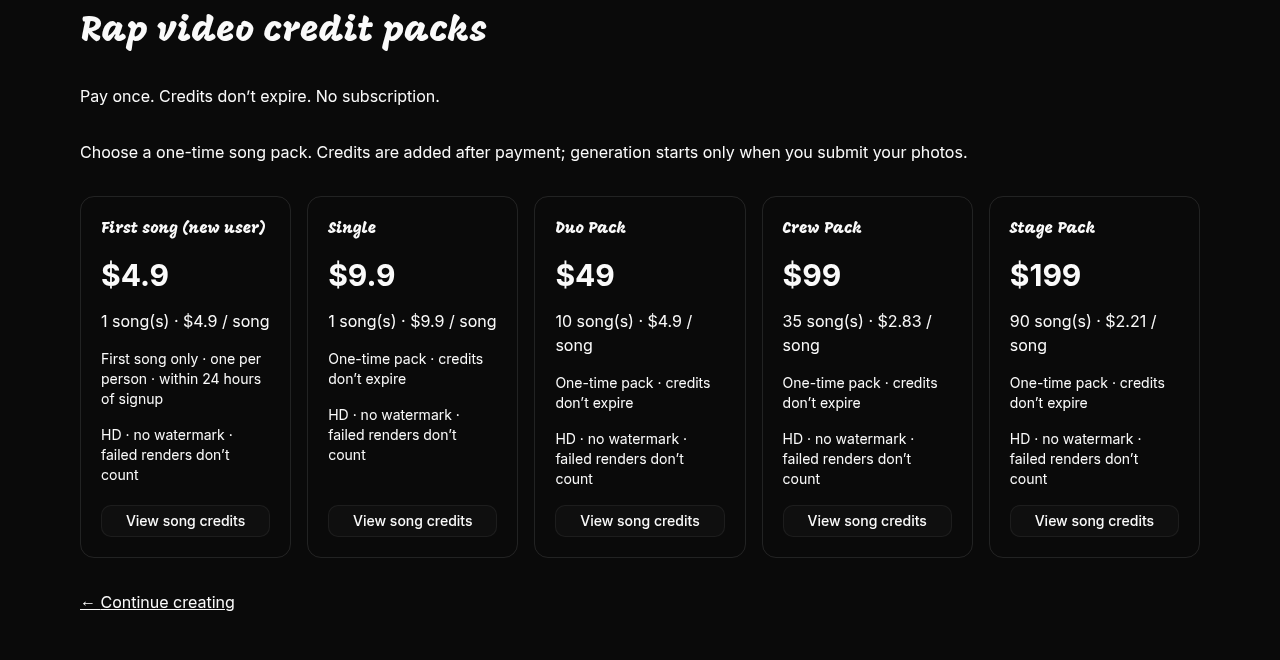
Source: getairap, https://getairap.com/pricing, captured 2026-10-27.
The footer names the stack it uses: lyrics by OpenAI GPT-6.1 Sol, audio and video by ByteDance Seedance 2.0 via Kie AI, photos from your uploads. That line is the site's own credit. The effect on this page is still the rap duo.
Best for: a browser, a one-time song pack, and two adults who agreed. No subscription on the packs.
Dreamina, rap video from a photo
Use this when you want a written performance and your account can run a video model. The prompt does not write the song. The article says to review identity, hands, framing, and continuity, then add music you have permission to use.
Direct link: AI Rap Video Generator from Photo
The article is timestamped 2026-10-24 05:24:11 UTC (2026-10-24 13:24:11 Asia/Singapore). It offers three prompts: Solo Studio Freestyle, Two-Person Rap Exchange, and Quiet Street Performance. Paste the duo prompt:
Use Photo A for the adult performer on the left and Photo B for the adult performer on the right. Place both in a bright minimal studio with one hanging microphone between them. Keep faces, outfits, proportions, and left-right positions fixed. Photo A performs first while Photo B nods and reacts; then Photo B answers while Photo A listens. Use one centered continuous shot, independent natural gestures, soft daylight, no identity swapping, face blending, overlapping bodies, extra people, text, or logos.
Upload one clear photo for each adult. Keep Photo A on the left and Photo B on the right. The article's how-to says to write identity, then action, then camera, and to review faces, hands, the microphone, and the positions before you add audio. Its FAQ says a portrait and a visual prompt do not provide the timing of a verse. Move to a lip-sync step when the mouths have to hit a track. The how-to prints no duration and no frame rate. The duo prompt prints no aspect ratio.
The article image is one clothed adult in a booth. It is the guide's example still, not a duo and not a clip we made. The video control on the article is labeled Dreamina Seedance 2.5.
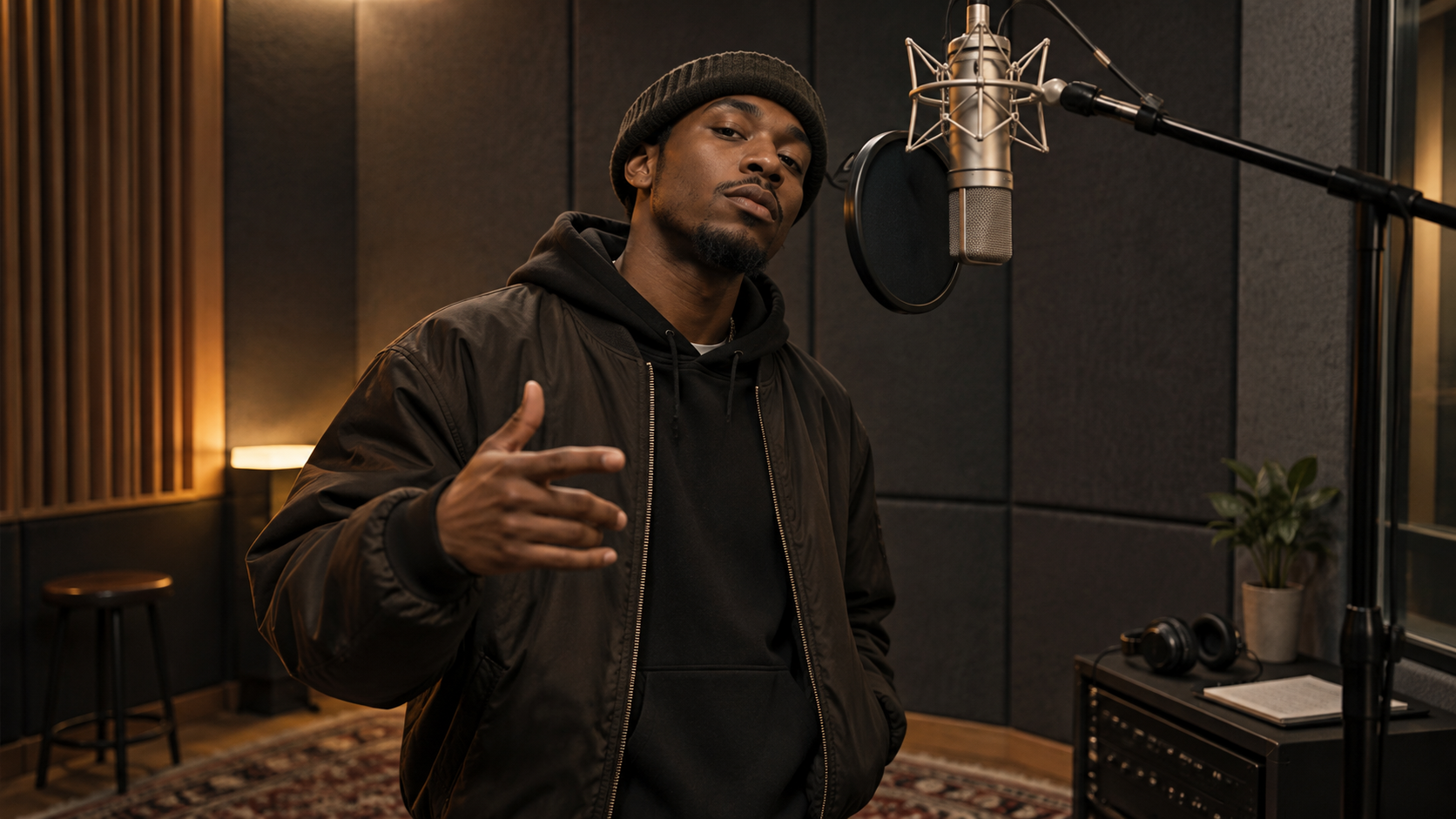
Source: Dreamina, https://dreamina.capcut.com/ai-video/ai-rap-video-generator-from-photo, image from the article.
Confirm the price in your account before you pay. A plan benefit list includes "Lip sync audio generations." That line is a subscription benefit. It does not change the FAQ: the prompt still does not time your verse.
Best for: a browser, two separate portraits, and a picture you will finish with audio you can use.
Kling, image to video, then lip sync
Use this when you already have the two photos and the Dreamina prompt, and you want the motion in Kling. Open image to video, attach the photos the form allows, and paste the two-person prompt. The page does not print a default ratio or a default length.
Then open the Kling AI Lip Sync guide, dated Nov 24, 2025. Generate the character video first, with a complete face. Upload a voice or a singing file you can use, or use the guide's text-to-speech. The guide prints this price: a 5-second video costs 5 inspiration credits, and a 10-second video costs 10 inspiration credits. If the audio is longer than the video, the guide says audio cropping is supported. Lip Sync in that guide is for videos generated in Kling 1.0 and Kling 1.5, and for human faces (real, 3D, or 2D). It is not for animal characters. The guide does not print a rate for a later Kling model. Do not copy a membership price from the Kling tool page onto this clip.
Best for: a browser, a short human performance, and audio you already have a right to use. The 5-second and 10-second lines are the guide's priced examples.
Other platforms
CapCut, Kling's effects list, and Higgsfield Genjutsu do not show a dedicated AI rap duo template. From some regions a CapCut template address opens another CapCut homepage. Nick Best's CapCut ID is an export watermark on his file.
Three steps
Tool — For a finished song, open getairap's generator and sign in when the page asks. For a picture you direct, open the photo prompt article, then open Kling image to video and paste the duo prompt. Lip-sync afterward with the Kling lip-sync guide and a track you can use.
Input — Use two selfies, or one photo that shows both adults, and only with permission from everyone pictured. On getairap, pick a topic and spend one song credit when you submit. On the prompt path, assign Photo A to the left and Photo B to the right, and paste this prompt:
Use Photo A for the adult performer on the left and Photo B for the adult performer on the right. Place both in a bright minimal studio with one hanging microphone between them. Keep faces, outfits, proportions, and left-right positions fixed. Photo A performs first while Photo B nods and reacts; then Photo B answers while Photo A listens. Use one centered continuous shot, independent natural gestures, soft daylight, no identity swapping, face blending, overlapping bodies, extra people, text, or logos.Leave a stranger, a child, and a celebrity photo off the upload. The strongman post and the lawyer post are their clips. They are not a release for your upload.Export — On getairap, keep the HD, no-watermark file the pricing page names. That page does not print a ratio or a length. On the prompt path, the article prints no duration and no frame rate, and the duo prompt prints no aspect ratio. If you lip-sync from the 2025 Kling guide, the priced lengths are 5 seconds (5 inspiration credits) and 10 seconds (10 inspiration credits), for a Kling 1.0 or 1.5 video of a human face. The two public clips are vertical: about 16.2 seconds at 720 by 1280, and about 24.1 seconds at 1080 by 1920. Those numbers describe those files. They are not an export setting a maker printed. Label anything you share as AI.
Before you post
- Likeness — Both adults have to agree before a selfie goes in. getairap's first step says to add the photos with permission from everyone pictured. Dreamina's how-to starts from an adult portrait and tells you to keep each identity fixed. The lawyer clip and the strongman clip are other people's work. They are not permission to drop in a friend, a stranger, or a public figure.
- AI label — Say the clip is AI. Nick Best's file shows a small Ai mark, and it still ends on an editor card. Put the same fact in the caption, and turn on the network's AI label when the upload form has one. Sample faces on the getairap homepage are labeled AI-generated. Yours will be too once the photos go through the generator.
- Rights — A generated beat is not a license you grant yourself, and a song inside someone else's template is not one either. The Hotel Lobby page is a different effect that keeps an existing performance's audio. Dreamina's FAQ says to use only music you own or have permission to use. The Kling guide's text-to-speech voices are the guide's own voices. Nothing on this page is legal advice.
Related pages
- Tools: Kling is the image-to-video and lip-sync path. The lip-sync price named here is the Nov 24, 2025 guide: 5 inspiration credits for 5 seconds and 10 for 10 seconds, on Kling 1.0 and 1.5. CapCut is the editor watermark on Nick Best's file. Read that tool's page for plan prices. This page does not copy them.
- Models: Seedance is the model family named on the prompt article (Dreamina Seedance 2.5) and in the getairap footer (Seedance 2.0 via Kie AI). Kling is the model family behind the lip-sync guide. Read those pages for plan prices. This page does not copy them.
- Workflows: AI avatar is the talking-person path when the job is a face, a voice, and a line. A rap duo adds a second person, a beat, and a stage. Read that workflow for the single-performer version.
FAQ
Can I start from one photo?
Yes, for a solo. The prompt article says to start with a sharp, evenly lit adult portrait and a solo booth or a street scene. A duo wants two photos, one for each adult, or one photo that already shows both people. getairap's first step allows two selfies or one photo together, with permission from everyone pictured. Keep the faces unobstructed.
Does the studio prompt write the lyrics and the beat?
No. The two-person prompt is a picture direction: who stands where, who performs first, and how the camera holds. The article's FAQ says a portrait and a visual prompt do not time a verse. getairap is the path that says it writes original lyrics and a beat. After a prompt clip, add a track you can use, then lip-sync.
Is this the same clip as Hotel Lobby AI?
No. Hotel Lobby AI drops two photos into one existing performance and keeps that motion and audio. An AI rap video is the duo performance itself. One-tap pages write a new rap. The prompt article gives you the studio picture and leaves the song to a later step. The orange booth and the hanging mic show up in both, including the lawyer clip on this page.
Can I put a pet in the lip-sync step?
The Kling guide dated Nov 24, 2025 says Lip Sync is for human characters and is not for animal characters. Use a complete human face for that step. getairap's pages ask for selfies of people. A pet still belongs to someone if you use a photo of one in a different tool.
Do I need a CapCut template?
No. Paste the two-person prompt, or use the getairap generator. A CapCut logo on Nick Best's last frame is an export watermark (CapCut ID 8899748839), not a template to open.
Related workflows
Related features
Related trends
Other effects made with the same tools and models.
- Toc Toc Dance AI — One photo of you or your pet becomes the one-foot hop and imaginary-door knock danced to Patrick Sébastien's song Toc toc.
- Gangnam Style AI — One photo of you or your pet becomes the Gangnam Style horse dance: wrists crossed on invisible reins, a gallop in place, a lasso overhead, a side shuffle, and a point at the camera.
- Charme Dance AI — One selfie becomes a short vertical clip of you front-row at a Rio baile charme, doing the charme side steps.
- Smalltown Boy AI — One photo per person, or per pet, becomes the Smalltown Boy dance: one screams into the camera while the other dances behind, then they swap.