First observed
0.01 Seconds Skull Cap
One front-facing photo becomes a short vertical clip that cuts from a bright, awkward look to a black skull cap, a hoodie, and a cold stare.
Checked by ClipNav Team · Last verified
from $4.99
Open Skull Cap AIThe pricing page lists one-time packs, no subscription: Standard $4.99 for one 10-second 480p video (10 credits), 1 HD $6.99 for one 720p video or two Standard videos (20 credits), 2 HD $11.99 (40 credits), and 3 HD $16.99 (60 credits). Credits never expire. A failed render returns its credits. Unused credits are refundable within 7 days. Standard and 1 HD can be paid as a guest by card, Apple Pay, or PayPal. The 2 HD and 3 HD packs need a sign-in. A verified email gets one free 4-second 480p preview per account and device, while the site's daily free previews last. The full 10-second video is paid. No watermark.
www.tiktok.com
Source: 2026-11-01 radar keyword skullcap. Know Your Meme's 27 October 2026 guide, two TikTok posts, Wikipedia's Wild Thoughts page, YouTube's altered-content help, Skull Cap AI, Skull Cap Trend, CapCut search, Kling's effects and image-to-video URLs, and Higgsfield Genjutsu.
What it is
The 0.01 seconds skull cap meme is a short vertical before-and-after. You start awkward in a bright room. The picture then switches to the same person in a tight black skull cap and a hoodie, staring into the camera. The caption's tiny time is the joke: the cut makes the change look instant.
You make the AI version from one front-facing photo. On the two generator pages the beats are already set, so you only upload the photo. The finished file those pages describe is about 10 seconds, vertical 9:16, with the trend sound already lined up to the switch. On those pages the cap in the after shot is a tight plain black knit skull cap with no logo. Two public takes are in wide use, and the two generators below follow different ones.
The camera-tip take opens with hands in the hair and goofy faces, tips the camera up, kills the lights, and brings the person back in the cap and hood. The pull-on take shows the cap in the hands, pulls it down, and hard-cuts to the dark room with the hood up and the glasses gone. The posts below are other people's clips. This page includes no clip we made. The people in the kept clips are clothed.
Source: Bobby Gilbert (@big_bobby6929) on TikTok, https://www.tiktok.com/@big_bobby6929/video/7697381314193935646
Bobby Gilbert posted this on 16 October 2026. The channel name is Bobby Gilbert🦈. The post time is 2026-10-16 21:31:07 UTC (2026-10-17 05:31:07 in Asia/Singapore). The duration is 11. The caption is "Lowk look like Marlon" with the tags #fyp #trend #skullcap #viral #satire. The track credit is "original sound" by SoulReligion. The saved file is 1080 by 1920, 11.517 seconds, with video and audio. He is clothed. At 0.4 seconds he is in a grey t-shirt with white earphones, one hand in his hair, pulling a face. On-screen text reads "How mfs feel after 0.000001 sec with the skullcap on". At 4.5 seconds he is pulling a white skull cap onto his head. At 8.5 seconds the hood of a black hoodie is up over that white cap and he looks into the lens. This early take uses a white cap. The black-cap version is the other post.
Source: @antoniopieterss on TikTok, https://www.tiktok.com/@antoniopieterss/video/7697897560224189716
@antoniopieterss posted this on 18 October 2026. The post time is 2026-10-18 06:54:09 UTC (2026-10-18 14:54:09 in Asia/Singapore). The duration is 10. The caption is the tags #fyp #skullcap #trend. The track credit is "original sound" by SoulReligion. The saved file is 1080 by 1920, 10.797 seconds, with video and audio. He is clothed. At 0.4 seconds he is in a bright room, in a brown plaid shirt and glasses, looking down at a black skull cap in both hands. On-screen text reads "How dudes start acting 0,01 seconds after putting on a skull cap". At 4.5 seconds both hands are pulling that black cap down over his head, still in the plaid shirt. At 6.5 seconds the room is dark, a black hoodie is up over a black skull cap, both hands hold the hood, and he looks into the lens. Glasses are not in that later frame.
Know Your Meme's guide, by K.J. Genualdo, is dated 27 October 2026. It says no single creator has been identified as the originator, and it dates these two posts to 16 October 2026 and 18 October 2026. Both posts, and the generator pages, use the TikTok sound "original sound" by SoulReligion. Know Your Meme and both generators identify that sound as a short excerpt of "Wild Thoughts." Wikipedia's article says "Wild Thoughts" is a song by DJ Khaled featuring Rihanna and Bryson Tiller, released on 16 June 2017. The song and the TikTok sound stay with their owners. This page does not quote the verse.
Template preview
www.tiktok.com
Timeline
The song is from 2017. The AI-meme posts on this page start on 16 October 2026. Both generator sites were still up on 1 November 2026. Status stays hot.
- 2017-06-16 · Wikipedia records "Wild Thoughts" as a song by DJ Khaled featuring Rihanna and Bryson Tiller, released on 16 June 2017. Later skull cap posts use a TikTok sound that Know Your Meme and the generator pages identify with this song. · Wikipedia
- 2026-10-16 21:31:07 UTC (2026-10-17 05:31 Asia/Singapore) · Bobby Gilbert (@big_bobby6929) posts the clothed skull cap take captioned "Lowk look like Marlon", with on-screen text about how it feels a fraction of a second after the cap is on. Know Your Meme dates this post to 16 October 2026. · TikTok
- 2026-10-18 06:54:09 UTC (2026-10-18 14:54 Asia/Singapore) · @antoniopieterss posts the clothed take whose on-screen text reads "How dudes start acting 0,01 seconds after putting on a skull cap". Know Your Meme dates this post to 18 October 2026. Skull Cap Trend links this video as the take its person version follows. · TikTok
- 2026-10-27 · Know Your Meme publishes "What Is The 'Skull Cap Trend'?" by K.J. Genualdo. The guide says the format spread on TikTok in mid-October 2026 and that no single creator is the confirmed originator. · Know Your Meme
- 2026-10-29 · Skull Cap AI's CapCut guide and its prompt guide both say "Updated October 29, 2026". The CapCut guide tells you to search the app for "skull cap" and says what you find changes from week to week. It does not give a template-detail URL. · CapCut guide · Prompt guide
- 2026-11-01 · Skull Cap AI and Skull Cap Trend were still up, with the upload form on each homepage. Kling's effects page, Kling's image-to-video page, and Higgsfield Genjutsu were still up. Those pages do not name this effect. · Skull Cap AI · Skull Cap Trend · Kling effects · Kling image-to-video · Higgsfield Genjutsu
Where to make it
Use a page built for this meme when you want the cut and the sound already lined up. Prices come from the product pages. Read the price on the button the day you pay. On both sites the form sits on the homepage, so that URL is the effect page.
Skull Cap AI
Direct link: Skull Cap AI
Price: Standard is $4.99 for one 10-second 480p video (10 credits). HD is $6.99 for one 720p video or two Standard videos (20 credits). Larger one-time packs on the pricing page are $11.99 and $16.99. A verified email can make one free 4-second 480p preview. There is no subscription and no watermark.
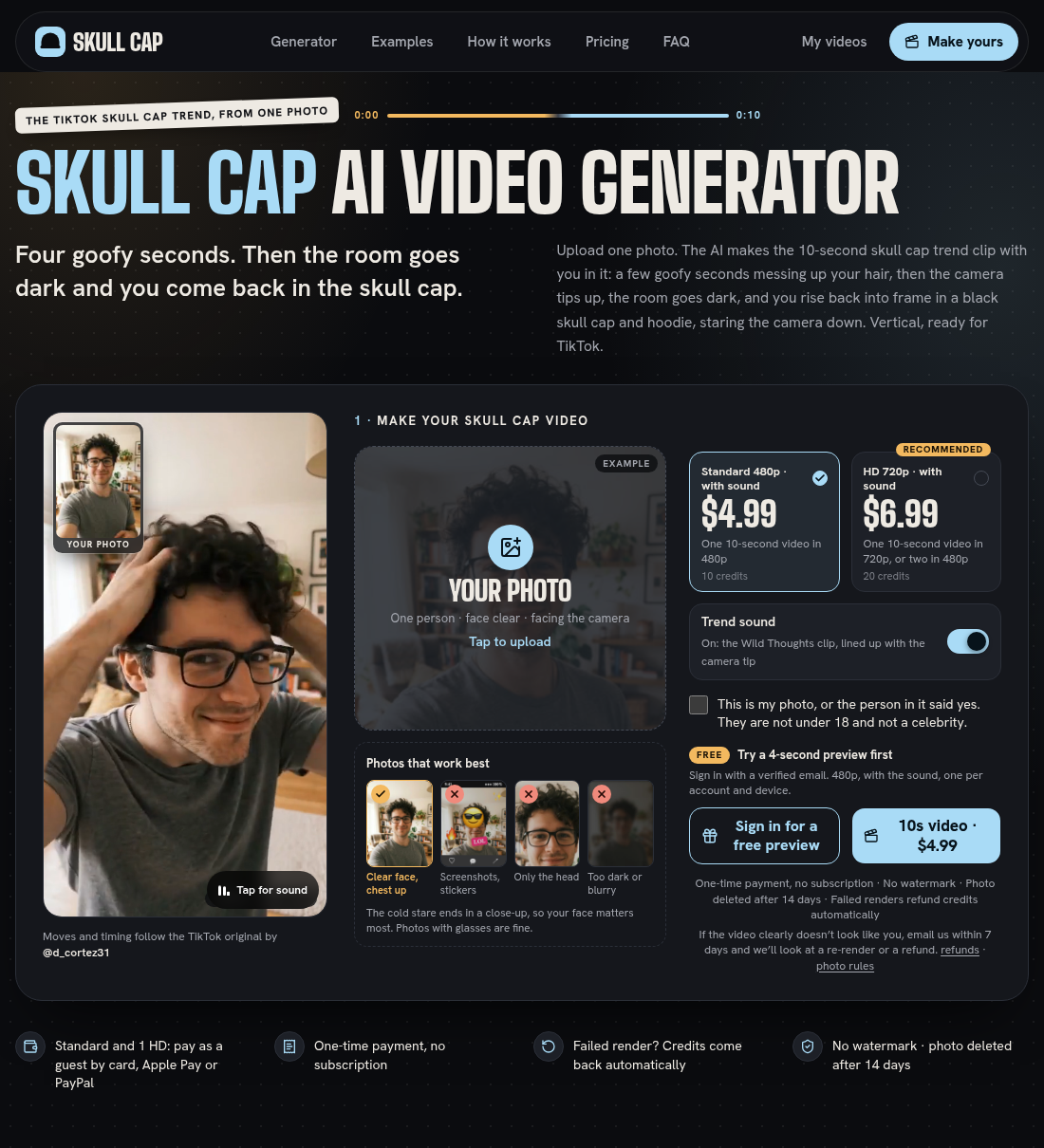
Best for: a phone or desktop browser, with no app to install. Pay Standard or one HD as a guest. Pick this page when you want the camera-tip version: hands through the hair, the camera up to the ceiling, the lights out, then the cap and hood.
Source: Skull Cap AI, https://skull-cap-ai.com/, captured 2026-11-01.
The homepage says you upload one photo and get a 10-second 9:16 clip. Its printed beats for the sample are 0–3.8 seconds of hands through the hair and goofy faces in your own clothes in a bright room, the camera tipping up at 3.8 seconds, the room going dark at 4.2 seconds, and 4.3–10 seconds back in frame in the skull cap and hood with a cold stare. It also says that in the trend clip it follows, the camera tips up at 4.75 seconds and the room goes dark at 5.1 seconds. The page attributes that motion to @d_cortez31. This page does not embed that TikTok post. The sample file at https://skull-cap-ai.com/video/skull-01.mp4 is 496 by 864, 10.005 seconds, with video and audio. Frames show a clothed man in a grey t-shirt and glasses, smiling in a bright room; a later frame looks up at a bright ceiling with both hands in his hair; later frames are a dark room, a black hoodie, a black skull cap, and a cold stare, with no glasses in those frames. The page says that photo was made with AI and is not a real person, and that customer photos are not shown.
Photo rules on the form: one person, face clear, facing the camera, chest up, good light. Glasses are fine. Screenshots, a head-only crop, and a dark or blurry photo are marked as poor fits. The checkbox says the photo is yours or the person said yes, and that they are not under 18 and not a celebrity. Photos are deleted after 14 days. A failed render returns the credits. The page says a 480p render takes about 3–5 minutes in its tests, and that you can close the page. Trend sound can be switched off before you generate.
Skull Cap Trend
Direct link: Skull Cap Trend
Price: Starter is $3.99 for 50 credits, one 10-second 480p video. Party is $6.99 for 100 credits, one 720p or two 480p. Crew is $17.99 for 300 credits, three 720p or six 480p. There is no subscription. The pricing page says Waffo is still activating payments and that purchases go live when that finishes.
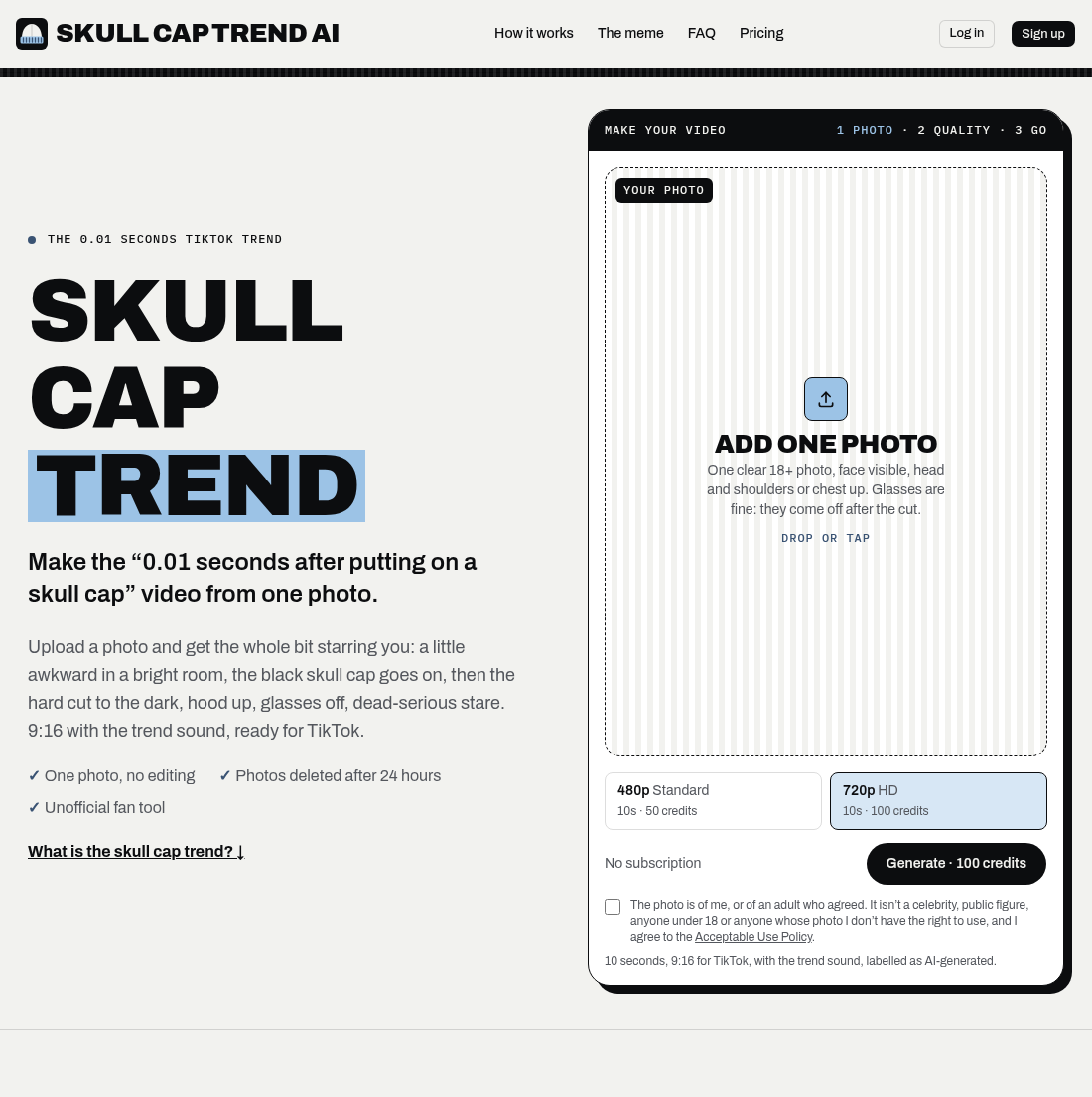
Best for: a browser, one clear photo of an adult, when you want the pull-on version: cap stretched over the head, a hard cut at 4.75 seconds, hood up, glasses off, cold stare. The homepage links the @antoniopieterss post above as the take it follows.
Source: Skull Cap Trend, https://skullcaptrend.com/, captured 2026-11-01.
The form asks for one 18+ photo, face visible, head and shoulders or chest up. It says glasses come off after the cut. Choose 480p Standard (50 credits) or 720p HD (100 credits), then Generate. The line under the button says the file is 10 seconds, 9:16, with the trend sound, labelled as AI-generated. The checkbox says the photo is of you or of an adult who agreed, and that it is not a celebrity, a public figure, anyone under 18, or a photo you have no right to use. Photos are deleted after 24 hours. A failed video returns its credits. Each finished video includes one free redo while the photo is still stored. The page says a pet version is not available. It also says it does not offer the song as a download.
Other platforms
CapCut's search for this phrase does not open a template page. Skull Cap AI's own guide, updated 29 October 2026, tells you to open CapCut, go to Templates, and search "skull cap", and it says those results change from week to week. Kling's effects page, Kling's image-to-video page, and Higgsfield Genjutsu do not name this effect. Those pages do not print a price for this effect. Confirm the credit cost on the screen before you generate. Sign in if you want to search inside the app.
If you are in a general image-to-video tool that takes one reference photo, paste this prompt. It follows the camera-tip beats printed on Skull Cap AI, not a string that page publishes as its own model prompt. Their prompt guide prints a shorter starting prompt that keeps the same clothes and the same lighting in both halves, and it tells you to add the sound when you post. Use the block below when you want the lights-out hoodie version.
Vertical 9:16 video, about 10 seconds, of the person in the reference photo. Keep their face recognizable.
0 to 4 seconds: bright room, their own clothes, no hat. They mess with their hair and pull awkward faces at the camera.
At about 4 seconds: the camera tips up to the ceiling and the room lights go out.
Then they rise back into frame wearing a plain black skull cap with no logo and a black hoodie with the hood up. They lean toward the camera and hold a cold, still stare. No smile.
Realistic, natural skin, no text, no captions, no watermark, no music.
If the cut lands in the wrong place, generate the bright half and the dark half separately and join them in an editor. That fallback is the one Skull Cap AI's prompt guide gives.
Three steps
- Tool — Open Skull Cap AI for the camera-tip, lights-out version, or Skull Cap Trend for the pull-on hard cut. In a general image-to-video tool, start a new clip from one photo and use the prompt above.
- Input — Upload one front-facing photo of one adult: chest or shoulders up, face sharp, even light, no sunglasses. Glasses in the photo are fine on both generator forms. Tick the permission box before you generate.
- Export — Save a vertical 9:16 MP4 of about 10 seconds. On Skull Cap AI pick Standard 480p (10 credits) or HD 720p (20 credits), and leave Trend sound on unless you want a silent file. On Skull Cap Trend pick 480p (50 credits) or 720p (100 credits). The sound is already in that file.
Before you post
- Likeness — Use a photo of yourself, or of an adult who agreed. Both forms reject anyone under 18. Skull Cap AI's checkbox also rules out celebrities. Skull Cap Trend's checkbox rules out celebrities, public figures, and any photo you do not have the right to use. Do not put a stranger's face into the cold-stare shot.
- AI label — YouTube's help page says creators must disclose realistic AI content during upload, including a real person appearing to do something they did not do, altered footage of a real event or place, and a realistic scene that did not occur. Skull Cap Trend says its file is labelled as AI-generated, and it tells you to say the clip is AI-made if TikTok asks. This meme shows a real face doing a scene that was not filmed, so label it wherever the app asks.
- Rights — "Wild Thoughts" and the SoulReligion TikTok sound belong to their owners. Skull Cap Trend says it does not offer the song as a download. Both generators can put a lined-up clip of the trend sound in the MP4. If you want the post to show up on TikTok's sound page, Skull Cap AI says to turn Trend sound off, upload the silent file, add the Wild Thoughts sound uploaded by SoulReligion, and line the beat up with the moment the room goes dark. Skull Cap Trend says to add "original sound - SoulReligion" in TikTok and turn the file's own audio down.
Related pages
- Tools: CapCut is the short-form editor for joining two generated halves or adding the TikTok sound to a silent export. Higgsfield is a multi-model studio with image-to-video, which is the general path for the prompt above. Kling is the app around the same kind of image-to-video job.
- Models: Kling is the image-to-video model page. Use one reference photo and the prompt in Where to make it.
- Trends: AI zombie video is the CapCut-or-Dreamina hug meme in the same one-photo before-and-after lane as this skull-cap cut.
FAQ
What does "0.01 seconds after putting on a skull cap" mean?
It is the caption joke. The cut is what makes a plain black cap look as if it changed the person's whole mood in an instant. The on-screen text in the @antoniopieterss post uses that line, with a comma in 0,01.
Do I need to own a skull cap or a hoodie?
Not on these two generators. Each one adds the black cap, the hoodie, and the dark room from one photo. Skull Cap AI's CapCut guide says a template is different: it edits footage you already filmed, so the after shot usually needs you in the cap.
What photo should I upload?
One adult, facing the camera, face sharp, chest or shoulders up, in even light. Glasses are fine. Skip sunglasses, screenshots, stickers, a head-only crop, and a photo that is too dark or blurry. The cold stare ends close to the lens, so a sharp face matters more than the outfit in the photo.
Why do the two generators not match each other?
They follow different public takes. Skull Cap AI prints the camera tip and the lights-out. Skull Cap Trend prints the cap pulled on and a hard cut at 4.75 seconds, and it links the @antoniopieterss video. Pick the page whose beats match the post you want to echo.
Can I post the file with TikTok's own sound?
Yes. Leave the generator sound on if you only need the beat inside the file. Turn it off, or duck it, when you want the upload listed under SoulReligion's original sound. Line the beat so it hits as the room goes dark or as the hard cut lands.
Related tools
Related models
Related workflows
Related features
Related trends
Other effects made with the same tools and models.
- Window Peeper — One photo of a person or a pet becomes a vertical night-window clip: the subject eats at a lit apartment window, stares into the camera, and a beige curtain closes.
- Hop Hop Hop AI — Two clothed adults in an 8-second vertical clip: one stands at the camera and points, the other hops farther back under a flat palm, then a hard cut swaps their places.
- Hotel Lobby AI — A template that drops two photos into Quavo and Takeoff's 2022 COLORS performance of Hotel Lobby and keeps the original motion and audio.
- Angry Dance Filter — One front-facing photo becomes a short vertical comic kitchen rant in the Bad Times angry-dance style.